About this app
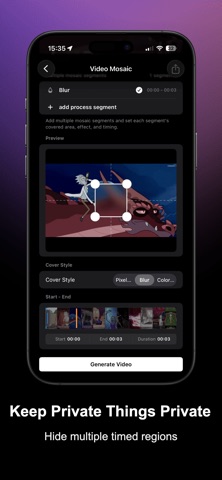
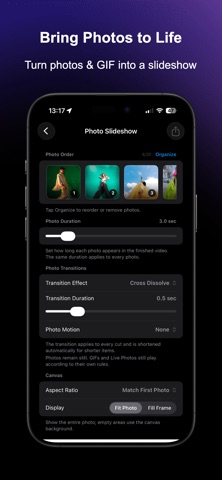
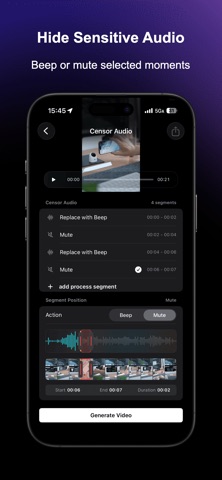
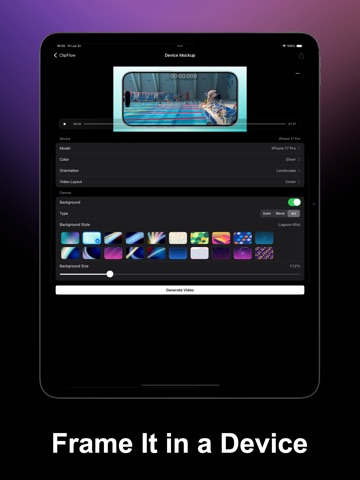
ClipFlow is a focused editor for everyday videos, screen recordings, and audio. Trim or join clips, add text, stickers, shapes, subtitles, and music, preview the result, then export. Instead of a complex timeline, it provides task-based tools you can open as needed. Favorite the tools you use most, filter Home to show only them, and manage the list in Settings. You can use ClipFlow to: - Trim video and audio clips to keep only the parts you need - Join multiple video or audio clips and reorder them; audio joining also supports gaps plus start and end silence - Create a Photo Slideshow from 2 to 30 still photos, GIFs, or Live Photos; reorder them, set one display time for all photos, choose transitions, and then add music to the silent video - Create video collages; independently arrange canvas and playback order, trim each video, and choose whether shorter videos stop when they finish or loop until the longest one ends in together mode - Change playback speed for fast-motion or slow-motion effects, or even reverse playback - Apply video filters and adjust brightness, contrast, saturation, and warmth - Add video fade-in and fade-out effects, with optional matching audio fades - Crop the frame or fit it to a new aspect ratio with a background, then rotate, flip, or compress the video - Preserve the source H.264 or HEVC family and HDR where the workflow, format, device, and system allow. Edits may still be re-encoded, and complete Dolby Vision metadata is not guaranteed - Convert compatible media formats on device: export video as MP4, MOV, or M4V; export audio sources or a video's soundtrack as AAC, M4A, MP3, WAV, AIFF, or CAF. A bundled local encoder creates MP3 files offline without uploading your media - Turn video clips into GIFs - Turn video clips into Live Photos - Add iPhone, iPad, or Apple Watch device frames to videos - Import subtitle files, recognize speech, or write subtitles manually, then adjust their position and style before embedding them - Add text, stickers, emoji, rectangles, circles, triangles, arrows, lines, stars, mosaics, elapsed timers, or current/full-duration timecodes. Style shapes with color, thickness, opacity, solid or dashed strokes, and optional fills. Add chapter progress bars with styles, time layouts, size, colors, placement, dividers, and titles. Save reusable text-watermark templates - Extract audio, remove original sound, replace background music, or mix in narration - Cover selected audio segments with a beep or mute them - Apply 17 character, space, device, and atmosphere sound filters to audio files, video soundtracks, or new recordings, producing a separate audio file - Turn speech into SRT, ASS, or TXT subtitles using on-device system recognition or downloadable local models - Convert text into spoken audio; system voices support Chinese, English, Japanese, French, Korean, Portuguese, Spanish, and German, while AI text-to-speech remains available; select multiple AI Speech History items and continue in Join Audio - View media details such as format, duration, size, frame rate, and audio tracks ClipFlow covers social posts, screen recordings, meetings, sports tutorials, travel videos, split-screen comparisons, audio effects, subtitles, GIFs, and Live Photos. Preview each result, adjust settings, and export when ready. Privacy and permissions: Video, audio, sound filters, and speech-to-subtitles are processed mainly on device. Photo, file, speech-recognition, and microphone permissions are requested only when needed. Downloadable speech models are fetched after confirmation without uploading your media or subtitles. Speech and voice results vary by language, device, system services, network, and environment. Terms of Use (EULA): https://www.apple.com/legal/internet-services/itunes/dev/stdeula/
Latest release
What’s New
- Added Shapes to Video: place rectangles, circles, triangles, arrows, lines, or stars, adjust their position, size, or angle, and style their color, thickness, opacity, stroke, and fill. - Added Favorites: star tools from media selection, manage them in Settings, and filter Home to show only favorites. - Video Collage now lets you independently arrange canvas order and numbered playback order, trim individual videos, and choose whether shorter videos stop when they finish or loop until the longest one ends when sources play together. - Added Chapter Progress Bar for full-video playback progress, with multiple static and animated styles, time layouts, height, colors, vertical placement, and optional chapter dividers and titles. - Add Timer now lets you switch between the default elapsed timer and a timecode showing the current video time over its full duration. - Added text video watermarks with freely positioned static placement, motion presets, font, size, color, opacity applied to both text and shadow, optional shadow styling, and reusable local template history. - Audio joining now supports leading silence, with start and end silence together in a dedicated settings section. - AI Speech History now supports multiple selection and can send selected audio directly to Join Audio. - System Text to Speech now uses a language menu and adds Japanese, French, Korean, Portuguese, Spanish, and German. Together with Chinese and English, it supports eight languages. - Audio export now supports MP3. - You can now export HDR video in HEVC. HDR is preserved where possible when supported by the source media, device, and export settings.
Audience growth
Ratings growth
Baseline captured. Growth appears after the crawler observes a changed rating count.
Momentum comes from crawler snapshots for the tracked storefront. “Viral growth signal” means unusually fast recent rating gains; it is an indicator, not download data.
Price tracking
Price intelligence
First snapshot captured. The trend line starts after the next crawler price observation.
- First observed Aug 5, 2026 · 7:40 PM Free
Screenshots