About this app
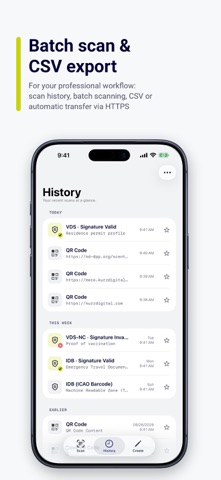
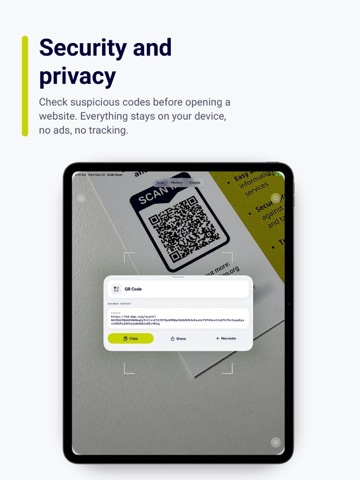
Scan and create every common 1D and 2D barcode - one at a time or continuously in Batch Scan. Export your history as CSV or automatically send scans to your own server. Unlike an ordinary scanner, Code Scan also verifies the cryptographic seals on official documents. WHAT IT READS • QR, MicroQR and rMQR (rectangular MicroQR) • DataMatrix, including DMRE • Aztec, PDF417, MaxiCode • EAN-8, EAN-13, UPC-A, UPC-E • Code 39, Code 93, Code 128, Codabar, ITF / ITF-14 • GS1 DataBar and DataBar Expanded • VDS, VDS-NC and IDB document seals Codes are decoded on your device: from the live camera, from a photo in your library, or from an image you share into the app from somewhere else. DIGITAL SEALS ON OFFICIAL DOCUMENTS This is what sets Code Scan apart: it does not just read the seal, it checks the cryptographic signature. • VDS (Visible Digital Seal, BSI TR-03137) in DataMatrix • VDS-NC (ICAO) and IDB (ICAO Datastructure for Barcode) in QR codes • Signatures verified against X.509 certificates, kept up to date automatically • Import your own X.509 certificates for closed ecosystems • MRZ data contained in a seal is parsed and shown in readable form This app supports reading and verification of (among others) VDS Profiles: - Social Insurance Card - Residence Permit Document - ICAO Visa Document - ICAO Emergency Travel Document - German Arrival Attestation Document - Address Sticker for German Identity Card - Place of Residence Sticker for German Passports VDS-NC Profiles: - ICAO PoT and PoV (ISO/IEC JTC1 SC17 WG3/TF5) CREATE YOUR OWN CODES • QR, DataMatrix, Aztec, PDF417 and Code 128 • Live preview while you type • Choose the QR error correction level (L / M / Q / H) or the PDF417 level (0-8) • Keep your codes in a library, mark favorites, share any of them as an image FASTER IN EVERYDAY USE • Camera light in four brightness steps and 1x / 2x / 4x zoom - for tiny print, dark rooms and laminated documents • Share a screenshot from any app to read the code inside it, or share a link to turn it into a code • Batch Scan: capture multiple codes without a result screen and save them straight to your history • Siri and Shortcuts: create a code or open the scanner by voice, or build both actions into your own shortcuts • Recreate a scanned code in a single tap, with the content already filled in A HISTORY THAT STAYS ORGANIZED • Grouped into Starred, Today, This Week and Before • Scanning a code again updates the existing entry instead of piling up duplicates • Export and share your scan history as a CSV file • Stored seals are re-verified in the background against the current certificates, so an expired signature stops showing as valid FOR PROFESSIONAL USE • GS1 application identifiers parsed and labelled • Open recognized links immediately, skipping the result screen • Copy and share the raw code data instead of the interpreted content • Optionally send scans automatically to your own HTTPS endpoint (off by default) • Play a confirmation sound after successful transfers • Native iPad layouts PRIVACY Decoding happens entirely on your device, and your history stays there. There is no account and no tracking. To verify seals, the app downloads the public signer certificates from our certificate service. The optional face comparison against a document portrait is the one feature that sends an image to a KURZ Digital service, and only when you start it yourself. For wishes and suggestions just contact us at info@kurzdigital.com
Latest release
What’s New
• Various design updates for iOS 27 and the new iPhone generation • Siri and Shortcuts dialogs for creating codes now follow the device language • The app asks for a rating much less often • Added support for more VDS and IDB document types • New: Export and share your scan history as a CSV file • Pro setting to send scans automatically to your own server (disabled by default) • New Batch Scan captures multiple visible codes directly to history without a result sheet (with or without a server) • Siri & Shortcuts: create a code or open the scanner hands-free - just ask Siri, or add these actions to your own shortcuts • Re-create a scanned code in one tap - opens the generator with the content already filled in If you have any questions or suggestions, please contact us at info@kurzdigital.com
Audience growth
Ratings growth
Momentum comes from crawler snapshots for the tracked storefront. “Viral growth signal” means unusually fast recent rating gains; it is an indicator, not download data.
Price tracking
Price intelligence
- First observed Aug 31, 2026 · 2:12 AM Free
Screenshots