About this app
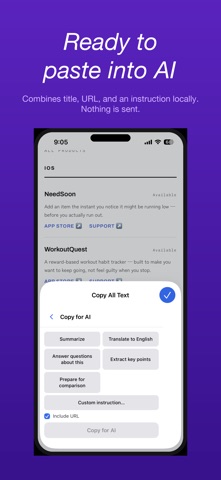
Safari on iPhone has no Select All for web pages. On a computer, Command + A takes a second. On iPhone, there is no equivalent. Copying a long article means dragging your finger down the screen and starting over every time the selection slips. Copy All Text adds the Select All that Safari is missing. One tap copies the whole page. COPY WHAT YOU NEED, IN A USEFUL FORMAT - Copy All Text: copies the page text readable in Safari. - Copy Article Only: removes ads, menus, and footers, then copies just the article body. - Tap to Select: tap one or more page regions instead of dragging text handles. - Copy for AI: locally formats content and an instruction for pasting into an AI chat. Nothing is sent. - Clean Copy: removes cookie notices, sharing controls, subscription prompts, and repeated clutter. - Copy as Markdown: keeps headings, links, and lists intact. If you already have text selected, only that selection is copied. GOOD FOR - Saving long articles into a notes app - Moving research into another app in one go - Passing page content to a translation service PRIVACY AND PRICING - Completely free. No ads. No in-app purchases. - No network access at all. Page content never leaves your device. - Nothing is stored or logged. - The extension only runs on the page where you tap the button. HOW TO USE 1. Enable the Safari extension in the Settings app. 2. Open any page in Safari. 3. Tap the extension icon in the address bar and choose a copy mode. Supports VoiceOver and Dynamic Type. Available in Japanese and English. Note: Depending on the structure of a website or its access restrictions, some text may not be retrievable.
Latest release
What’s New
Added "Send Feedback" in Settings. If a page doesn't copy cleanly, let us know right from the app. Our support site and contact address have moved to margheritaworks.com.
Audience growth
Ratings growth
Baseline captured. Growth appears after the crawler observes a changed rating count.
Momentum comes from crawler snapshots for the tracked storefront. “Viral growth signal” means unusually fast recent rating gains; it is an indicator, not download data.
Price tracking
Price intelligence
First snapshot captured. The trend line starts after the next crawler price observation.
- First observed Sep 14, 2026 · 5:30 PM Free
Screenshots