About this app
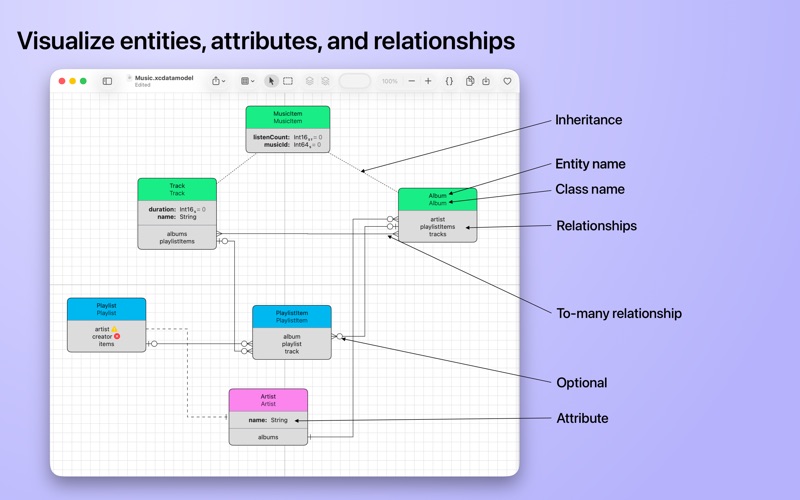
CoreDiagram is the easiest way to visualize your Core Data and SwiftData models on macOS. Open any .xcdatamodeld file from your Xcode project and see the entire entity graph laid out for you in seconds - relationships, inheritance, attributes, the lot. Free. No sign-up. No subscription. No nag screens. KEY FEATURES • Visualize entire Core Data and SwiftData model graphs from .xcdatamodeld files • Open versioned models and pick which version to view, with the layout carried over from your previous version • Generate ready-to-use SwiftData code from any model with a single click • See entity inheritance, relationships, attributes, and constraints at a glance • Group related entities together to organize large schemas • Interactive zooming, dragging, and selection • Export your model diagram as PDF for documentation, code review, or printing • Real-time updates: edit your model in Xcode and watch the diagram refresh • Beautifully laid out with customizable colors per entity • Lightweight, native macOS app built with SwiftUI PERFECT FOR • Migrating Core Data models to SwiftData and needing a clear picture of what you have • Onboarding to a new codebase with a complex data model • Documenting your schema for code reviews, technical specs, or architecture decisions • Exploring what's actually in that .xcdatamodeld someone committed three years ago SWIFTDATA SUPPORT CoreDiagram understands the full Core Data model format and generates idiomatic SwiftData code with @Model classes, relationships, inverse keypaths, and inheritance. Whether you're starting a new SwiftData project from scratch or migrating an existing Core Data model, the generated code is a solid starting point. OPTIONAL SUPPORT CoreDiagram is genuinely free. No features are locked away. If it saves you time or makes your day a bit better, you can support development by leaving a tip - there's a small heart in the toolbar. No pressure, no obligation. SUPPORT For bug reports, feature requests, or just to say hi, email support@joylordsystems.com Privacy Policy: https://www.joylordsystems.com/corediagram-privacy-policy Terms of use: https://www.joylordsystems.com/corediagram-eula
Latest release
What’s New
Dragging is much faster, as smooth as butter! Versioned models now open properly. If you have an .xcdatamodeld with several versions inside, CoreDiagram shows you a picker so you can choose which one to open, instead of using Show Package Contents. When you add a new version in Xcode it inherits the layout from your previous.
Audience growth
Ratings growth
Baseline captured. Growth appears after the crawler observes a changed rating count.
Momentum comes from crawler snapshots for the tracked storefront. “Viral growth signal” means unusually fast recent rating gains; it is an indicator, not download data.
Price tracking
Price intelligence
First snapshot captured. The trend line starts after the next crawler price observation.
- First observed Aug 13, 2026 · 5:07 AM Free
Screenshots