About this app
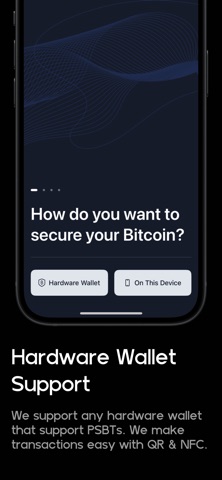
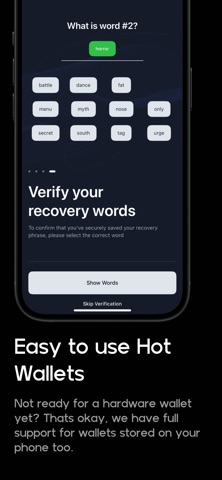
Cove is a Bitcoin wallet built for everyday use and advanced self-custody. Create a mobile wallet in seconds, restore with Cloud Backup, or connect your hardware wallet for cold storage security. Use Cove to send, receive, back up, restore, and manage Bitcoin on your terms. Why Cove? • Simple Bitcoin wallets Create a wallet in seconds. Your private keys are encrypted and stored locally, secured by Face ID or Touch ID and a PIN you control. • Cloud Backup and passkey restore Back up Cove with iCloud Drive and restore your wallets with a passkey after reinstalling the app or setting up a new phone. • Hardware wallet support Connect Coldcard, TAPSIGNER, Krux, and other hardware wallets. Cove supports PSBT signing with QR, BBQr, and NFC flows. • Clear wallet scanning See scan progress while Cove checks your transaction history. Balances and transactions can appear before the full scan finishes. • Safer receiving Cove watches your current receive address for activity and warns before copying an address that has already received funds. • Full UTXO control Select, label, search, filter, and track coins with BIP329-compatible labels for smoother workflows across Cove and desktop wallets like Sparrow. • Watch-only wallets Import and monitor wallets without storing private keys on your phone. • Advanced send tools Choose custom fees, send selected coins, handle PSBTs, and use advanced wallet controls when you need them. • Security-focused design Cove keeps sensitive wallet data on your device, uses stronger encrypted local storage, and supports optional security tools like decoy and wipe PINs. • Open and auditable Cove is powered by the Bitcoin Development Kit and is open source, so anyone can review how it works. Advanced features when you’re ready: • Watch-only wallet support • Hardware wallet signing • Custom Electrum and Esplora servers • Custom fee selection • Coin control and UTXO search • BIP329 transaction notes and labels • Recovery phrase verification • Optional decoy and wipe PINs • iCloud Drive Cloud Backup • Passkey-based restore Whether you’re setting up your first Bitcoin wallet or managing cold storage from your phone, Cove gives you a simple, private, and powerful way to use Bitcoin. Bitcoin, on your terms. Support: support@covebitcoinwallet.com Privacy Policy: covebitcoinwallet.com/privacy Terms & Conditions: covebitcoinwallet.com/terms
Latest release
What’s New
Cove 1.3 makes backup, restore, and wallet scanning easier to understand. - Back up Cove with iCloud Drive on iOS - Restore your wallet with a passkey after reinstalling Cove or setting up a new phone - New setup screens help you create, import, or restore a wallet - Wallets now show scan progress, and balances and transactions can appear sooner while scanning continues - Improved scanning across different wallet address types - Receive screens now watch the current address for activity and warn before copying an address that has already received funds - More accurate wallet imports across account numbers and address types - Safer send amount entry when pasting text - Added an About screen and clearer Cloud Backup, wallet, and security status messages - Improved startup recovery, encrypted local storage, transaction details loading, and iOS reduced transparency support
Audience growth
Ratings growth
Baseline captured. Growth appears after the crawler observes a changed rating count.
Momentum comes from crawler snapshots for the tracked storefront. “Viral growth signal” means unusually fast recent rating gains; it is an indicator, not download data.
Price tracking
Price intelligence
First snapshot captured. The trend line starts after the next crawler price observation.
- First observed Sep 7, 2026 · 4:36 PM Free
Screenshots