About this app
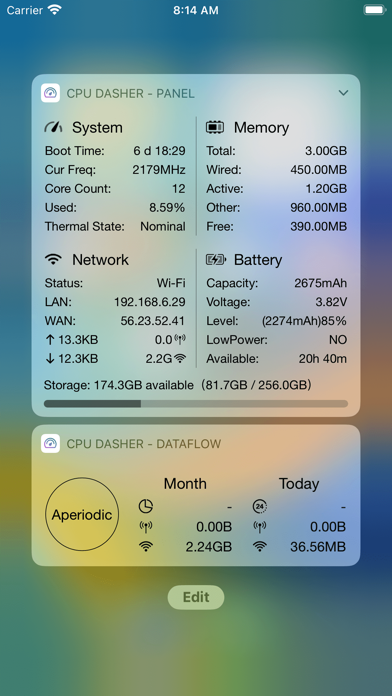
CPU Dasher Master ! is a versatile assistant to view device information Mainly divided into some sections 1, Equipment information 2, CPU information 3, Memory information 4, Battery information 5, Network information 6. Quick view of widgets 7. Widget skin customization 8. Common tools: heart rate test, network tool, noise test, make a decision, traffic statistics, screen test, etc. This is the current App Store rare, you can easily view the device information, detailed parameters of the device to be aware of, jia driving safety. The key is: the current frequency, memory details, detailed battery, network information is updated in real time. wow! HealthKit: Step count and distance widgets, you need to authorize the App to obtain HealthKit data permission before displaying your step count and exercise distance data today.
Latest release
What’s New
- Added info panel settings: option to show the info panel on app startup, and always-on display support. - Added an iPerf3 network throughput test with TCP upload/download, parallel streams, live charts, and result sharing. - Added several new network tools and improved the experience of existing tools. - Improved battery runtime estimates, live/history chart switching, and report export with support for HTML, PDF, and image formats. - Fixed multiple stability and UI display issues. Note: After updating, Today View widgets and other legacy widgets may fail to load or disappear. Restart your device to restore them. Recent Updates - Improved the Dhrystone benchmark. - Added a time-range traffic statistics widget. - Added support for refreshing Home Screen widgets by tapping configured areas. - Added Night Vision. Devices without a LiDAR scanner may not support this feature. - Added URL Schemes for opening tools directly. View them in the Tools settings page. - Added traffic statistics to the large Hardware Info widget. - Added custom font support for Home Screen widgets. - Added a week-number display option to the Calendar widget. - Added the Tile Panel widget. - Added public holiday and make-up workday notices to the Calendar widget. - Added simulated transparent widget backgrounds. - Added new widgets, including step-count widgets. - Added router name display to the Hardware Info widget. Location permission is required. - Added a battery-level display option to the Time & Calendar widget. - Added skin customization for Home Screen widgets. Legacy widgets remain available, and their skins are configured separately. - Improved traffic statistics accuracy. Adding an iOS 14 Home Screen traffic widget can further improve accuracy. - Added more than ten downloadable fonts. - Added the ability to save Noise Test results. - Further improved traffic statistics accuracy. - Added a Heart Rate Test. Please send us any questions or suggestions through the Feedback section.
Audience growth
Ratings growth
Baseline captured. Growth appears after the crawler observes a changed rating count.
Momentum comes from crawler snapshots for the tracked storefront. “Viral growth signal” means unusually fast recent rating gains; it is an indicator, not download data.
Price tracking
Price intelligence
First snapshot captured. The trend line starts after the next crawler price observation.
- First observed Sep 15, 2026 · 3:17 AM Free
Screenshots