About this app
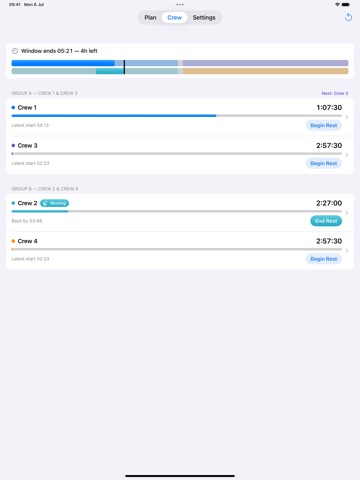
Crew Rest Planner divides an in-flight rest window fairly between 2–5 flight crew and tracks the rest each member actually takes. Set the rest window by start and end time — or start time and total duration — and choose your crew size. The app organises the crew into seat groups automatically: • 3 crew rotate evenly through one rest position • 4 crew split into two pairs (Crew 1 & 3, Crew 2 & 4) • 5 crew form a pair and a trio Each crew member gets a fair rest entitlement after a configurable return-to-seat buffer (default 5 minutes). On the Crew board, tap Begin Rest when a member leaves and End Rest when they return — or enter the times by hand. Remaining rest counts down live, and the app shows each member’s “back by” and “latest start” times so nobody oversleeps their share. FEATURES • 2–5 crew with automatic seat grouping • Fair rest entitlement per crew member • Live rest ledger — log breaks with one tap, remaining time drains in real time • “Back by” and “latest start” times for every member • Multi-lane timeline showing logged rest against the suggested rotation • Return-to-cockpit alerts before a member’s rest runs out • UTC (zulu) or local time, 24-hour or 12-hour clock • Fast keypad time entry (or classic wheels) • Apple Watch companion — window countdown and every member’s remaining rest Crew Rest Planner is a planning aid. Always follow your operator’s procedures and applicable flight-time limitations. No account, no sign-in, no data collection — everything stays on your device.
Latest release
What’s New
• Rest alerts are now Time Sensitive, so return-to-cockpit and window-end notifications break through Sleep Focus and Do Not Disturb • Alert times now follow your UTC/local and 12/24-hour settings • Reliability improvements
Audience growth
Ratings growth
Baseline captured. Growth appears after the crawler observes a changed rating count.
Momentum comes from crawler snapshots for the tracked storefront. “Viral growth signal” means unusually fast recent rating gains; it is an indicator, not download data.
Price tracking
Price intelligence
First snapshot captured. The trend line starts after the next crawler price observation.
- First observed Aug 19, 2026 · 5:55 PM Free
Screenshots