About this app
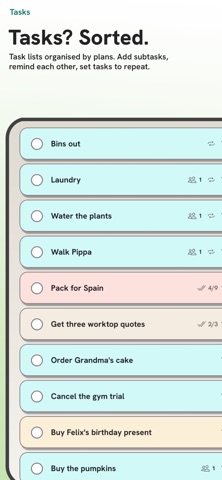
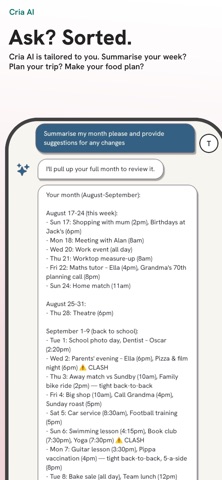
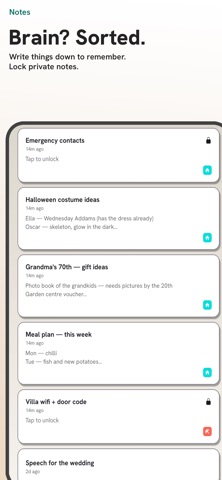
One planner for your whole crew. Cria Planner puts your calendar, tasks, notes and shared costs in one place, so the school run, the food shop and the summer trip stop living in four different apps. PLAN TOGETHER Create a shared plan and invite your people. Everyone sees the same events, the same lists and the same notes, updated the moment anyone changes anything. And everyone you invite gets the full app free — one subscription covers the whole family. STOP CHASING EVERYONE Assign a task to someone and set a reminder that reaches their phone, not just yours. When they forget anyway, nudge them: one tap pings their phone right now, and they answer "On it" straight from the notification without opening the app. Built for busy households, forgetful teenagers, and keeping a gentle eye on parents and grandparents. SPLIT THE COSTS Give any plan a budget. Log what everyone spends, split it between members — or with guests who don't need the app at all — then settle up in one round where each person ticks off what they've paid. Who owes who, solved. YOUR WHOLE DAY, ONE SCREEN My Day gathers today's events, due tasks and pinned notes from every plan into a single feed. Open the app, see what matters, get on with your day. LET CRIA BUILD IT Describe the trip or the week ahead and the Cria assistant drafts the whole plan for you, events and tasks and all. Included from Family upwards. EVERYTHING ELSE - Month, week and day calendar views, colour-coded by plan - Quick add that reads plain English: type "dentist tomorrow 3pm" and the date sets itself - Import the events already sitting in your device calendar - Subtasks, drag to reorder, and a satisfying tick - Notes with file attachments, lockable behind Face ID when they are private - Voice dictation into any note - Recurring events, snooze buttons on reminders, and a morning digest at 8am - Accent colours, dark mode, and an animal avatar for everyone in the plan WORKS OFFLINE The full planner runs on your device with no account and no connection needed. Subscribe, or get invited to someone else's plan, and everything syncs across your devices and criaplanner.com in any browser. PLANS Free - the full planner, on one device, with ads. Duo - sync, no ads, and share with one other person. Family - share with up to 5 people, plus the Cria assistant. Group - up to 15 people. Max - up to 25 people. Subscriptions are available monthly or yearly, auto-renewing until cancelled, with yearly saving around 17%. Prices are shown in your own currency in the app before you buy. Payment is charged to your Apple Account on confirmation, and renews unless auto-renew is turned off at least 24 hours before the period ends. Manage or cancel in your Apple Account settings. Privacy Policy: https://criaplanner.com/privacy Terms of Use: https://www.apple.com/legal/internet-services/itunes/dev/stdeula/ Made by Alpaca Media. A cria is a baby alpaca, which is where the name and the whole herd of avatars come from.
Latest release
What’s New
New in 2.5.3: • Bulk edit — select several items to assign, remind, repeat or nudge at once • Archive plans you're done with, without deleting anything • Invite by email — no account needed to receive one • Star plans & budgets as Favourites, pinned to the top • Set a subtask's priority right from the checklist • Due dates, reminders & repeats no longer clear each other out • Refreshed calendar and a proper wide-screen layout
Audience growth
Ratings growth
Baseline captured. Growth appears after the crawler observes a changed rating count.
Momentum comes from crawler snapshots for the tracked storefront. “Viral growth signal” means unusually fast recent rating gains; it is an indicator, not download data.
Price tracking
Price intelligence
First snapshot captured. The trend line starts after the next crawler price observation.
- First observed Sep 4, 2026 · 7:10 AM Free
Screenshots