About this app
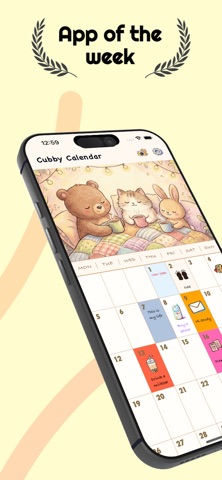
Cubby Calendar - Your Personal Happy Calendar Transform your daily planning into a delightful experience with Cubby Calendar! This beautifully crafted app combines functionality with aesthetic charm, featuring a warm, hand-drawn design that makes every day feel special. KEY FEATURES CUSTOMIZABLE CALENDAR • Add cute icons to any day • Write personal notes and memories • Choose from 36+ beautiful colors for each day • Customize text colors for perfect readability • Adjust text and icon sizes to your preference BEAUTIFUL DESIGN • Warm, cozy color palette with notebook aesthetic • Hand-drawn fonts for a personal touch • Smooth animations and intuitive interface • Custom theme images to match your mood • Minimalist, distraction-free experience PERSONALIZATION • Upload your own photos as calendar themes • Full control over visual appearance • Switch between light and warm backgrounds • Timeline view to see all your entries at a glance • Make it truly yours SHARE & SAVE • Capture and share your calendar as beautiful screenshots • Save memories to your photo library • Share your creative calendar designs with friends • Perfect for social media MULTILINGUAL SUPPORT • Full support for English, Chinese, Japanese, and Korean • Automatic language detection based on system settings • Seamless switching between languages • Localized week labels and interface PRIVACY FIRST • All data stored locally on your device • No account required - start immediately • No data collection or tracking • Your memories stay completely private and secure • Works 100% offline Whether you're planning your week, tracking special moments, journaling your thoughts, or simply enjoying a beautiful calendar, Cubby Calendar makes every day a little more special. Perfect for: Daily journaling and note-taking Mood tracking with colors and icons Memory keeping and reflection Event planning and organization Creative expression Mindfulness and gratitude practice Download Cubby Calendar now and start creating your personalized calendar today!
Latest release
What’s New
Fix the app month is not correct issue
Audience growth
Ratings growth
Baseline captured. Growth appears after the crawler observes a changed rating count.
Momentum comes from crawler snapshots for the tracked storefront. “Viral growth signal” means unusually fast recent rating gains; it is an indicator, not download data.
Price tracking
Price intelligence
First snapshot captured. The trend line starts after the next crawler price observation.
- First observed Aug 20, 2026 · 1:46 AM Free
Screenshots