About this app
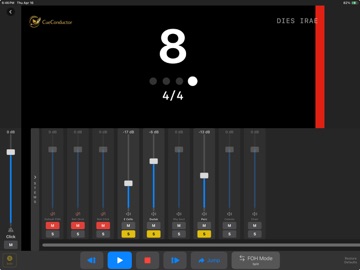
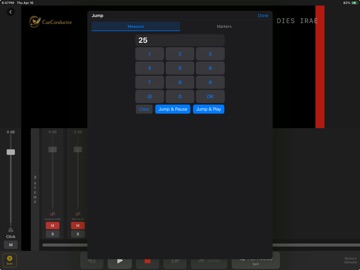
Conduct hybrid orchestral performances and lead recording sessions with stems, click, scoring video, and the printed score — locked to one transport, on every stand. CueConductor is the workstation for conductors, performers, and engineers working where acoustic musicians meet pre-produced tracks. Load a package, hit play, and follow the counter, beat dots, color-coded streamers, and punches in real time. Conduct from the PDF score with pages that turn themselves, and put a CueConductor on every stand with the podium driving them all. No tempo map yet? Record or import audio in TempoMapper™, tap along, and turn a live performance into a finished cue. No external click box, no fragile cabling, no surprises. FEATURES • Load .conductpkg packages: stems, click, scoring video, PDF score and parts • Real-time counter, beat-grouped dots, color-coded streamers, punches • Conduct from the score: auto page turns, Apple Pencil markup, Bluetooth pedals • Score & Parts: one cue carries the full score and every part — each player picks their own and the device remembers it • Conductor Mode: broadcast the show to every stand on the Wi-Fi — no cables, no MIDI • Link to DAW: sample-accurate sync from an AU, VST3, or AAX plug-in — or classic MTC • Single-tap jump to any bar, rehearsal letter, or marker • Per-stem faders, mutes, and solo; independent click and FOH pan with mono fold • TempoMapper™: record from any interface or import stems, tap the tempo as it plays, and fine-tune beat anchors on the waveform — transient snapping and a built-in click • CueBuilder™: build packages from a MIDI file, stems, PDFs, and scoring video — or send TempoMapper's tempo map, click, and stems in with one tap • Save works-in-progress as projects and finish them later • Export QLab packages: overlay video with stems numbered for one drag into your cue list, plus setup notes for the FOH engineer • Frame-accurate scoring video on an external display • Catalog browser for licensed packages ON THE CONCERT STAGE Place your iPad next to the score — or use it as the score — patch it into the hall's PA, and stay in sync with pre-recorded tracks. Watch the counter, streamers, and punches; the orchestra hears only the music. In rehearsal, locate instantly to any bar or rehearsal letter. Reading from tablets? Conductor Mode puts every stand on the Wi-Fi under your transport — counter, beat dots, streamers, and page turns, each player on their own part. One router at the podium runs the whole section. IN THE STUDIO Conductors — patch the control-room headphone mix into your phones alongside your iPad and see tempo, click, and stem playback privately. Performers — download the package ahead of the session, locate to the tricky bars, hear the cues, walk in prepared. Engineers — build a package from the MIDI file, stems, and video already in your Pro Tools, Logic, Cubase, or Digital Performer session. Insert the CueConductor Link plug-in on the main output and the session streams straight to the conductor's screen — sample-accurate, no MIDI setup, no timecode routing. Composers and music directors — no tempo track? Record the performance (or drop in a bounce), tap the beats in TempoMapper, nudge the anchors onto the transients, and bounce a tempo-perfect MIDI map, click, and stems into CueBuilder. Rubato and all. Composed a cue wild, with no click? Tap in its tempo map and you have one — a click that breathes with your performance. PRICING Free to download with a 30-day trial of all features. After the trial, TempoMapper, CueBuilder, QLab Export, External Video, and External Sync require CueConductor Pro (in-app purchase). Playback, importing, the catalog, projects, and sharing stay free forever. Licensed performance editions from Vision Music Publishing unlock External Sync and External Video for that title on every device — no subscription on the stands. Works on iPhone, iPad, and Mac.
Latest release
What’s New
Conduct from the printed score, put a CueConductor on every music stand, and sync to your DAW without a MIDI cable. This is the largest update since launch. SCORE & PARTS Cues now carry the printed music. Attach a PDF score — and every instrument part — then rotate to portrait: the page replaces the scoring video with the conductor overlay flying over it. Pages turn themselves from the cue's own tempo map with a configurable beats-early lead. Drop a whole stack of part PDFs into CueBuilder and they sort into concert order, name themselves, and read their own measure numbers to build the page maps. Each player picks a part once and every cue follows. Mark up the page with Apple Pencil — annotations save per part, per device. Bluetooth page turners work throughout. CONDUCTOR MODE One device on the podium broadcasts the show to every CueConductor on the Wi-Fi: counter, beat dots, streamers, and page turns all follow the conductor. No cables, no MIDI, no audio to distribute. One router runs the whole ensemble. LINK TO DAW Insert the CueConductor Link plug-in (AU, VST3, AAX) on your session's main output and CueConductor follows it — sample-accurate, with no MIDI setup at all. Shared memory on the Mac; Wi-Fi or a plain USB cable to iPad and iPhone. It tracks even while the DAW is parked, counts you in through the session's pre-roll, and streams to several devices at once. All four plug-in formats install from inside the app. SYNC YOU DON'T HAVE TO CALIBRATE External sync has been rebuilt. The overlay now follows the master clock directly, and audio and video join on hardware-scheduled appointments. Locate anywhere and everything lands together — no offsets to tune, no drift over a long cue. MIXING Click and FOH each have their own pan, and panning off-center folds to mono, so hard left or right carries the complete mix into one ear. The old Split/Stereo modes are gone. CATALOG Titles can now be shared as a link: tap it and CueConductor opens right at that cue. The catalog browses as folders, and performance editions carry a license that unlocks External Sync and External Video for that title on every stand — no subscription needed. ALSO • Pre-roll count-in when the DAW starts ahead of the cue • Beat dots pulse on the beat instead of holding • Automatic page turns can be switched off per player • Mixed sample rates are flagged when a cue opens • Audio can stay live during external sync • Courtesy time signatures travel with meter-change streamers • Scroll or Auricle streamer direction, or no overlay at all • Extensive fixes to timing, sync, plug-in hosting, and stability
Audience growth
Ratings growth
Baseline captured. Growth appears after the crawler observes a changed rating count.
Momentum comes from crawler snapshots for the tracked storefront. “Viral growth signal” means unusually fast recent rating gains; it is an indicator, not download data.
Price tracking
Price intelligence
First snapshot captured. The trend line starts after the next crawler price observation.
- First observed Aug 26, 2026 · 5:44 PM Free
Screenshots