About this app
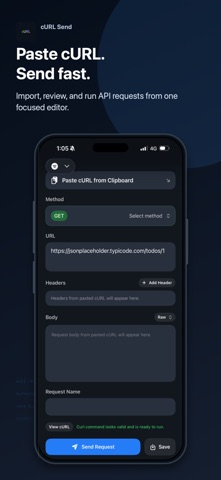
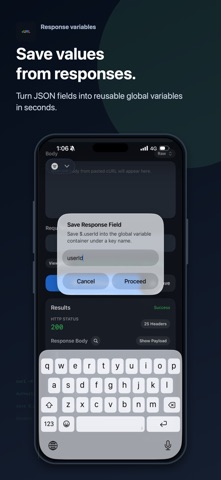
cURL Send is a fast mobile API client built for developers who want to test requests directly from iPhone. Paste a cURL command from your clipboard, review the method, URL, headers, and body, then send the request in a focused mobile workspace. It is designed for quick API checks, debugging, backend testing, webhook inspection, and working with REST endpoints when you are away from your desktop. Import cURL instantly Paste a cURL command from your clipboard and turn it into an editable request. cURL Send parses the request into clear fields so you can inspect and adjust the method, URL, headers, and body before sending. Test APIs from your iPhone Send HTTP requests and view response status, headers, and body in a clean dark interface. JSON responses are formatted for easier reading, with response search to help you find fields quickly. Save response values Capture supported JSON response fields into a global container. Save IDs, tokens, status values, or other response data under reusable keys. Reuse values in headers Use saved global values in header fields for follow-up requests. This helps with common API workflows like saving a user ID, session value, token, or other response field and reusing it in the next request. Built for mobile API workflows cURL Send is ideal for: - Testing REST APIs - Debugging HTTP requests - Inspecting JSON responses - Running copied cURL commands - Reusing response values in headers - Checking backend endpoints from iPhone - Quick API validation without opening a desktop tool Whether you are debugging a backend service, checking a webhook, validating an endpoint, or testing an API while mobile, cURL Send gives you a simple cURL-first workflow on iPhone.
Latest release
What’s New
New in cURL Send 0.3.0: - Added Environment Profiles so you can manage values across Default, Dev, Staging, and Prod-style setups. - Added in-app feedback from the request menu, with optional contact email and privacy-conscious diagnostics. - Improved Response Body search for structured JSON responses, including live matches, result navigation, and better auto-scrolling to the active match. - Improved request editing and result navigation so imported cURL commands and responses scroll into view more reliably. - Fixed stale View cURL overlays after leaving saved-request or history detail screens. - Fixed top-left menu dismissal when tapping outside the menu. - Improved Postman-style form-urlencoded cURL imports, including repeated fields and encoded form data. - Added regression coverage for menu dismissal, response search, and form-urlencoded cURL parsing.
Audience growth
Ratings growth
Baseline captured. Growth appears after the crawler observes a changed rating count.
Momentum comes from crawler snapshots for the tracked storefront. “Viral growth signal” means unusually fast recent rating gains; it is an indicator, not download data.
Price tracking
Price intelligence
First snapshot captured. The trend line starts after the next crawler price observation.
- First observed Sep 6, 2026 · 2:13 PM Free
Screenshots