About this app
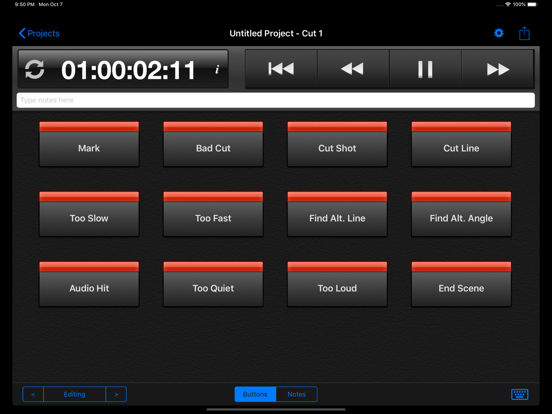
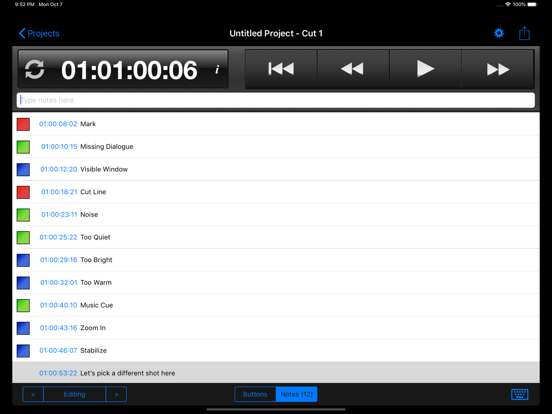
Cut Notes is an iPad note-taking app for post production professionals. Take notes on the fly using quick preset buttons, all synced to the timecode of your editing application. Used worldwide by studios and freelancers alike, Cut Notes allows you to focus on the cut instead of looking down to write. Cut Notes is integrated with the Kollaborate cloud workflow platform which allows you to easily share notes with colleagues and clients, as well as having collaborative note-taking sessions. Note: Cut Notes does not play video and is designed as a companion app synchronized to another video source. If you're looking for a video player that will allow you to take notes, please see our other product, CinePlay: https://itunes.apple.com/us/app/cineplay/id561280759?mt=8 TIMECODE Sync timecode from Kollaborate, Final Cut Pro 6/7, Final Cut Pro X, Adobe Premiere Pro CS 6.0.2 for Mac, Adobe Premiere Pro CC, Avid Media Composer / Symphony for Mac, Adobe Audition and Pro Tools. Additionally, Cut Notes should be able to sync to any app that supports MIDI timecode. NOTE KEYS With a single tap of a notekey, the note is added instantly at the current timecode position. Create notekey sets for different tasks such as editing and mixing. MANUAL ENTRY Create a custom note at any time with the text box above the notekeys. Cut Notes will insert the note at the moment you first began typing so there’s no need to rush. CUSTOMIZE Change any notekey, create notekey sets and color code the keys. CLOUD INTEGRATION Make notes on your Kollaborate videos and sync them instantly to the cloud. Sync timecode directly from your web browser and remotely control playback. View comments by colleagues instantly and take part in collaborative note-taking sessions. EXPORT Cut Notes can export notes to Final Cut Pro 6/7, Final Cut Pro X, Avid Media Composer and Pro Tools (via the third-party application EdiMarker). Importing a Marker List into Final Cut Pro 7 or FCPX requires the free Cut Notes Marker Import utility for macOS available at http://www.digitalrebellion.com/cutnotes. "Cut Notes is a perfect example of how an iPad can supplement production & post production workflows." - Craig Bergonzoni, Editor/Producer "I'm really happy with the software… I'd feel comfortable using Cut Notes in a screening with executives." - Chris Chris Losnegard, Story Producer See the user manual to find out how to sync to various applications. For Support please visit http://www.digitalrebellion.com/support/cutnotes.
Latest release
What’s New
You can now batch export all cuts for a project in a single step from the Projects pane.
Audience growth
Ratings growth
Baseline captured. Growth appears after the crawler observes a changed rating count.
Momentum comes from crawler snapshots for the tracked storefront. “Viral growth signal” means unusually fast recent rating gains; it is an indicator, not download data.
Price tracking
Price intelligence
First snapshot captured. The trend line starts after the next crawler price observation.
- First observed Aug 19, 2026 · 8:38 AM $14.99
Screenshots