About this app
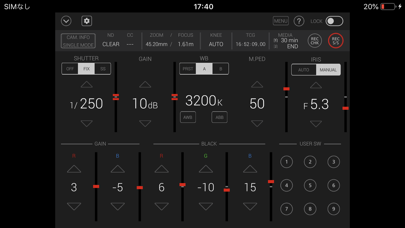
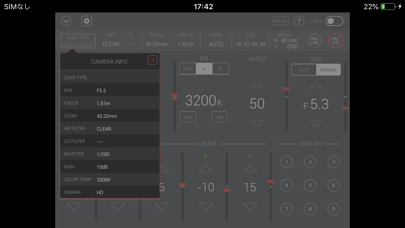
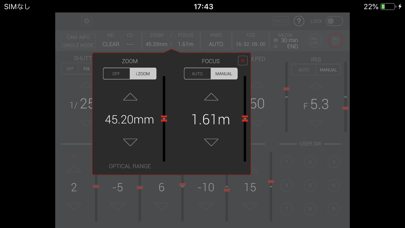
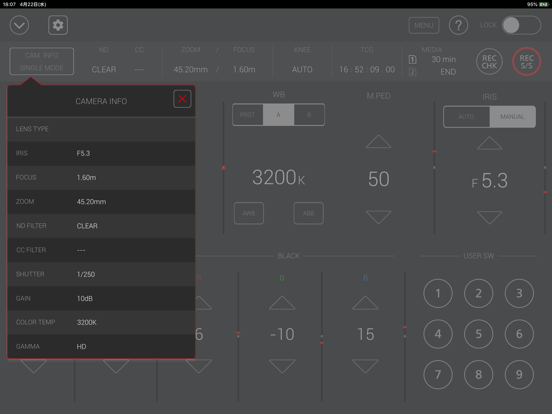
=== Name of App === CX ROP (CX series memory camera recorder Remote Operation Panel) === Description === CX ROP is a control program that enables the wireless remote control of the memory camera recorder "Panasonic CX series". It provides a GUI that displays status information, settings and user switch status in a single screen and the ability to change camera settings intuitively using a screen touch. Buttons such as user buttons and REC S/S button in screen can manipulate camera recorder. CX ROP cam manipulate one memory camera reorder by switching up to eight memory camera reorders. Please tap a "?" button to see a hint for usage of this app. [NOTE] For wireless LAN connection with the camera, a wireless module needs to be purchased separately. https://pro-av.panasonic.net/en/ === Applicable Model === AG-CX350 series. (AG-CX350 / CX350P / CX350PJ / CX350EJ / CX350ED / CX350EN / CX350AN / CX350PX, AJ-UPX360MC, AG-CX200MC) AG-CX4000 series. (AJ-CX4000G, AJ-UPX900MC) === Supported OS === iOS12 or later === Features === 1. Camera status display - List of camera information - ND/CC FILTER - ZOOM/FOCUS - KNEE - TCG - Remaining time of recording media 2. CONTROLLABLE FUNCTIONS - SHUTTER (OFF/FIX/SS) - GAIN - WHITE BALANCE(PRE/A/B, AWB, ABB) - MASTER PEDESTAL - IRIS(AUTO/MANUAL) - Painting GAIN(R/B) - Painting BLACK(R/G/B) - USER SW (1-9) *AG-CX350 series (1-5) *AJ-CX4000 series - MENU display and setting - HELP - LOCK (disable operation on CX ROP) - Switching CAM/BARS Output image - ZOOM (i.ZOOM / i.ZOOM OFF) *AG-CX350 series Only. - FOCUS(AUTO/MANUAL) *AG-CX350 series Only. - KNEE(AUTO/MANUAL/OFF) - TCG(TC/UB display and setting) - REC CHECK - REC Start/Stop - REC META DATA setting 3. Settings and switching of a connected camera You can set or switch connected cameras in a connect setting panel by tapping a connect manipulation button in the screen. Please refer to "CONNECTION" item by tapping "?" for details. 4. Automatic Connected Camera Search Function Easy IP protocol automatically searches for cameras on the same network. It is effective when [Easy IP] is [20 MIN.] or [UNLIMITED] on the camera side. === NOTE === 1) With iOS14, permission is required for local network communication. Select [Settings]-[Privacy]-[Local Network] and enable the [CX ROP] switch. 2)In iOS, camera information may not be displayed correctly on the app screen. This can be fixed by turning on airplane mode and then turning off again. ・SETTINGS 1. Close "CX ROP". 2. Select "Settings" on the device home screen 3. Turn on "Airplane mode" 4. Turn off "Airplane mode" 5. Launch "CX ROP" *These settings need to be repeated after turning off or restarting the device.
Latest release
What’s New
Minor bug fixes.
Audience growth
Ratings growth
Baseline captured. Growth appears after the crawler observes a changed rating count.
Momentum comes from crawler snapshots for the tracked storefront. “Viral growth signal” means unusually fast recent rating gains; it is an indicator, not download data.
Price tracking
Price intelligence
First snapshot captured. The trend line starts after the next crawler price observation.
- First observed Aug 7, 2026 · 3:50 AM Free
Screenshots