About this app
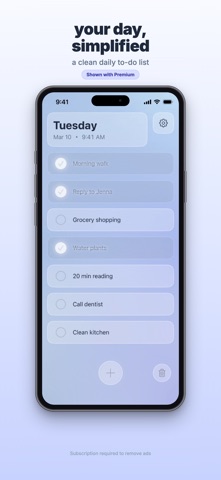
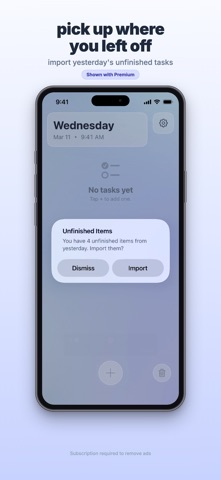
••• HOW IT WORKS ••• - Add tasks for today and check them off as you go. - Tap the date to open a notes space for the day — jot down anything that isn't a to-do. - Stay focused with a clean, simple layout. - Start each day fresh without losing track of unfinished items. - Import unfinished tasks and yesterday's notes when you want to bring them forward. ••• NOTES, THE DAY-BY-DAY WAY ••• - Every day gets its own notes page, just a tap away. - Bullet lists: type "- " or "• " to start a list, swipe to indent or outdent. - Copy your whole note to the clipboard with one tap. - Notes carry over with your unfinished tasks if you choose to import — or stay behind if you'd rather start clean. ••• BUILT FOR A CALMER DAY ••• - Focus on one day instead of juggling everything at once. - Choose from multiple themes to match your style. - Use 12-hour or 24-hour time. - Move completed tasks to the bottom automatically. ••• SIMPLE BY DESIGN ••• - Fast, lightweight, and easy to use. - Designed to help you feel organized without feeling overwhelmed. - Great for daily routines, errands, work tasks, journaling, and everything in between. Free to use with ads. Upgrade to Premium to remove ads. ••• LINKS ••• - Apple EULA: https://www.apple.com/legal/internet-services/itunes/dev/stdeula/ - Privacy Policy: https://rodsoftware.com/pages/day-by-day-privacy - Terms of Service: https://rodsoftware.com/pages/terms-of-service - Support Email: support@rodsoftware.com - Legal Email: legal@rodsoftware.com
Latest release
What’s New
• Tap the date card to open per-day notes • Bullet lists with swipe to indent and outdent • Yesterday's notes carry over alongside unfinished tasks in the import dialog • Smoother swipe-to-complete and swipe-to-delete on the todo list • Cursor and selection now use your chosen theme's color
Audience growth
Ratings growth
Baseline captured. Growth appears after the crawler observes a changed rating count.
Momentum comes from crawler snapshots for the tracked storefront. “Viral growth signal” means unusually fast recent rating gains; it is an indicator, not download data.
Price tracking
Price intelligence
First snapshot captured. The trend line starts after the next crawler price observation.
- First observed Sep 19, 2026 · 12:25 AM Free
Screenshots