About this app
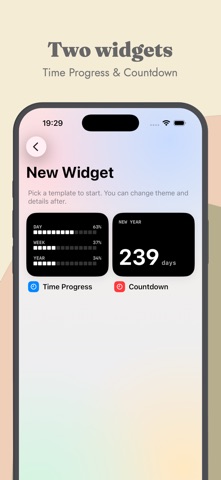
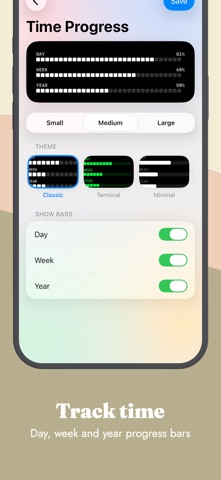
DayBar turns the passing of time into something you can actually see. Add a widget to your Home or Lock Screen and watch the day, week, and year fill up — pixel by pixel — or count down to the moments that matter most. TIME PROGRESS See exactly how much of today, this week, and this year has already gone by. A clean pixel progress bar updates throughout the day, so a single glance tells you where you stand. COUNTDOWNS Count the days to birthdays, trips, deadlines, or the New Year. Start from a ready-made preset or create your own event in seconds. FIVE HANDCRAFTED THEMES • Classic — clean and timeless • Terminal — glowing green phosphor • Minimal — quiet and understated • Neon — bright pink and cyan • Warm — soft amber glow MAKE IT YOURS • Pick a font: Mono, Rounded, Sans, or Serif • Adjust weight, alignment, and color • Set your own photo as a background • Multiple widget sizes for Home and Lock Screen ALWAYS UP TO DATE Widgets refresh automatically throughout the day, so your progress and countdowns are current every time you look — no need to open the app. DAYBAR PRO Unlock every premium theme and customization option with DayBar Pro — as a monthly or yearly subscription, or as a one-time Lifetime purchase. The core widgets are free, so you can start the moment you download. Download DayBar and make every day count. Terms of Use: https://www.apple.com/legal/internet-services/itunes/dev/stdeula/
Latest release
What’s New
Bug fixes and stability improvements.
Audience growth
Ratings growth
Baseline captured. Growth appears after the crawler observes a changed rating count.
Momentum comes from crawler snapshots for the tracked storefront. “Viral growth signal” means unusually fast recent rating gains; it is an indicator, not download data.
Price tracking
Price intelligence
First snapshot captured. The trend line starts after the next crawler price observation.
- First observed Sep 19, 2026 · 12:25 AM Free
Screenshots