About this app
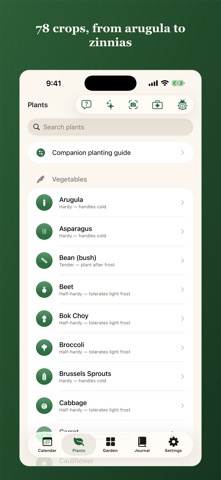
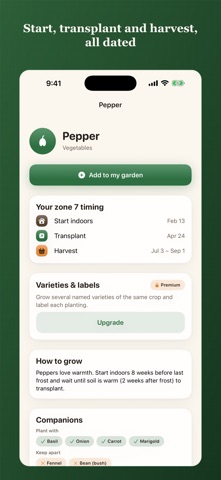
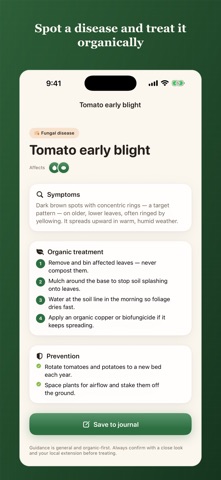
Dibble is a planting calendar built around your actual garden. No account needed, and your data stays on your devices. Enter your ZIP or postal code. Dibble reads your hardiness zone and local frost dates and works out exactly when to start seeds indoors, direct sow, transplant and harvest each crop. Then it reminds you at the right time, all season. PERSONALIZED PLANTING CALENDAR • Your zone, your frost dates and a per-crop calendar in seconds • 78 crops: vegetables, herbs, flowers, berries and fruit trees, from tomatoes and garlic to dahlias and strawberries • Start-indoors, sow, transplant and harvest windows for your location • With Premium, the calendar adapts when this year's frost runs early or late, and shows you the evidence • Works across the United States, Canada, Australia and New Zealand SEASONAL REMINDERS • "Start tomatoes indoors now," "time to transplant," "first frost approaching" • Mark a task done straight from the notification • Scheduled on your device, with no account AT A GLANCE • Home Screen and Lock Screen widgets with today's tasks, tickable without opening the app • On frost nights, a Live Activity keeps the warning on your Lock Screen until morning • Today's tasks on your Apple Watch • Find any crop or planting from iPhone search GARDEN JOURNAL • Note what you planted and how it is doing, with photos • Build a history that makes next year easier • Garden Wrapped, a recap of everything you grew this season ASK DIBBLE Quick answers to planting questions, worked out on your device from your own garden and zone. GROW DEEPER (Premium) Try the camera first: three plant, pest or disease identifications a season are free. • Adaptive calendar: your dates shift with this year's actual weather, not just the 30-year average • Bed layout planner, square-foot style, with companion-planting warnings • Succession planting and crop rotation • Varieties and labels • Harvest and yield tracking, plus a seed inventory with a packet scanner • Perennials and fruit trees followed across years • Houseplant care, with watering, feeding and repotting reminders • Multiple gardens • Live frost and rain alerts for your location • Diagnose plant diseases and pests from a photo, with organic fixes, entirely on your device • Identify plants from a photo, entirely on your device IN THE OFF SEASON Dibble switches to planning mode with a countdown to your last frost, so winter is for ordering seeds and mapping next year's beds. YOUR DATA IS YOURS Export your whole garden as JSON or CSV whenever you like, and restore a backup onto any device. PRIVATE BY DESIGN Your garden data never leaves your devices. Dibble is local-first: everything lives on your device and syncs only through your own iCloud. No account, no ad-tracking, no servers holding your data. Plant and disease identification run entirely on-device, so your photos are never uploaded. Free includes the full personalized calendar, reminders, the complete crop library, journal, widgets and the Apple Watch app. Premium unlocks the adaptive calendar, layout, succession, varieties, harvest tracking, perennials, houseplants, multiple gardens, photo pest and disease ID and frost alerts, as a monthly or yearly plan (with a 7-day free trial) or a one-time Lifetime unlock. Planting dates are estimates based on your zone and typical local frost dates. Results vary by microclimate and weather, so always verify with your local cooperative extension before planting. Terms of Use (EULA): https://dibblegarden.com/terms/ Privacy Policy: https://dibblegarden.com/privacy/
Latest release
What’s New
A new icon, and a taste of Premium for everyone. • Try the camera for free: three plant, pest or disease identifications a season, on your device, before deciding on Premium. A photo Dibble cannot place does not count. • One free frost warning a season. When a frost is in your local forecast, Dibble tells you the evening before, no location permission needed. • A new app icon: the seedling against a harvest sun. • If you let Premium lapse, a welcome-back price may be waiting for you. • The rating prompt now waits for a good moment, like a logged harvest, and asks less often. Fixes: the Garden screen now opens the right Premium page for the feature you tapped.
Audience growth
Ratings growth
Baseline captured. Growth appears after the crawler observes a changed rating count.
Momentum comes from crawler snapshots for the tracked storefront. “Viral growth signal” means unusually fast recent rating gains; it is an indicator, not download data.
Price tracking
Price intelligence
First snapshot captured. The trend line starts after the next crawler price observation.
- First observed Sep 9, 2026 · 4:39 AM Free
Screenshots