About this app
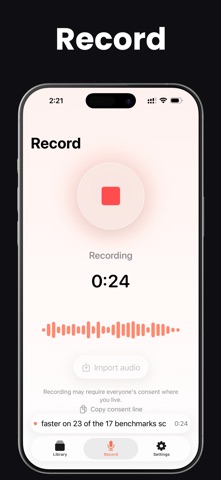
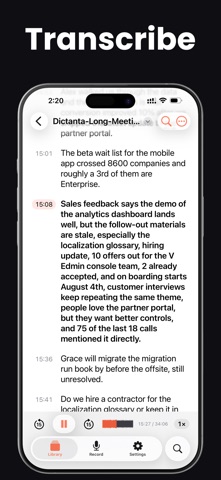
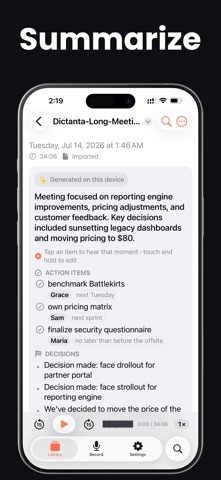
Be in the meeting. Let your iPhone take the notes. When your judgment is the reason you're in the room, taking notes is the worst job you can give yourself. Dictanta listens instead — and the moment you stop, your notes are already written: • A short summary (the TL;DR) • Your action items — who agreed to do what, and by when • The decisions you made • Open questions to follow up on Tap a line and the audio jumps to the exact moment it was said. Verify a quote in two seconds — no more "wait, did they really say that?" And it all happens on your iPhone. Your audio never leaves your device. Not to us. Not to anyone. WHY YOU'LL LOVE IT ▸ Stay in the conversation. No typing, no scrambling to catch the last point. Record, and your notes are ready the second you stop. ▸ Know the hour is being kept. If a recording ever stops early, Dictanta tells you right away and keeps everything up to that moment — so you never discover an empty recording after a conversation you can't have again. ▸ Send the follow-up while everyone still remembers. Share Recap turns your notes into one clean message — summary, owners, deadlines — ready to send before people leave the room. No transcript attached unless you choose it. ▸ Trust every line. Tap a bullet to hear exactly where it came from — the one thing no cloud notetaker can do. WHAT YOU CAN DO • Record with one tap — with live captions as you speak. • Keep recording with your screen locked or in other apps — watch it in the Dynamic Island, stop it from your Lock Screen. • Start by voice ("Siri, start a Dictanta recording"), from the Action Button, Control Center, or a Shortcut. • A to-do with nobody's name on it gets an "Assign" button, so you can add the owner before you send your notes on. Touch and hold any item to fix who owns it or when it's due. • Never lose a word — your transcript saves every 30 seconds, and a recording that was cut short is kept and clearly marked "Recovered". • Long meeting? Even hours-long recordings come back with clean action items and decisions. • No more "New Recording 47" — recordings name themselves after the topic. • Glance at your wrist — it appears in your Apple Watch Smart Stack. No watch app needed. • Search titles, transcripts and summaries — from the Search tab or Spotlight. • Find any word in a transcript and jump straight to it. • Heard a name wrong? Touch and hold any transcript line to fix it. • Translate any transcript into 8 languages, on device. • Import your own audio (M4A, MP3, WAV, AIFF and more). • Export PDF, Word, SRT subtitles, Markdown or JSON — to Mail, Notes, Files, Slack, or anywhere. • On iPad: a 3-column split view, drag action items into your other apps, real menus, and keyboard shortcuts. IN A ZOOM, TEAMS OR MEET CALL? GET DICTANTA ON MAC iPhone and iPad record from the microphone (and AirPods). For video calls, Dictanta on Mac captures the meeting audio plus your own voice, without ever joining as a bot. Transcripts and summaries sync here through your iCloud; the audio stays on the Mac. PRIVACY, SIMPLY PUT • Your audio is saved on your iPhone and stays there. The microphone permission is the only thing we ever ask for. • iCloud sync — for transcripts and summaries only. Audio is never copied. • No ads. No trackers. No analytics. No crash reporting. PRICING • 3 free recordings to try everything. • Pro Annual — $79.99/year (save 33%) • Pro Monthly — $9.99/month, cancel anytime • Lifetime — $149.99 once. No auto-renew. Yours forever. Prices shown in US dollars; your own price appears in the App Store. Restore purchases anytime in Settings. REQUIREMENTS iPhone or iPad on iOS 26.4 / iPadOS 26.4. On-device summaries need Apple Intelligence, turned on (iPhone 15 Pro or later; iPad with M1 or later). Privacy Policy › https://fierce-inlet-63133.herokuapp.com/dictanta-privacy Terms of Use › https://www.apple.com/legal/internet-services/itunes/dev/stdeula/
Latest release
What’s New
• On a long meeting, the summary now tells you it's still writing, instead of looking stuck. • A to-do with nobody's name on it now has an "Assign" button, so you can add the owner before you send your notes on. • An action item you've fixed yourself is marked "edited by you". • Search results and your library now show when a recording was made, instead of a vague "2 weeks ago". • The player no longer covers the line you're reading.
Audience growth
Ratings growth
Baseline captured. Growth appears after the crawler observes a changed rating count.
Momentum comes from crawler snapshots for the tracked storefront. “Viral growth signal” means unusually fast recent rating gains; it is an indicator, not download data.
Price tracking
Price intelligence
First snapshot captured. The trend line starts after the next crawler price observation.
- First observed Aug 7, 2026 · 6:38 AM Free
Screenshots