About this app
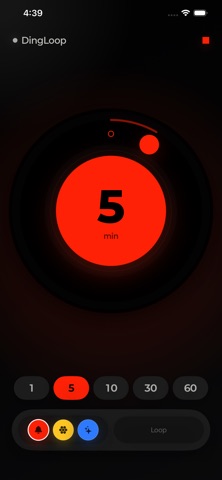
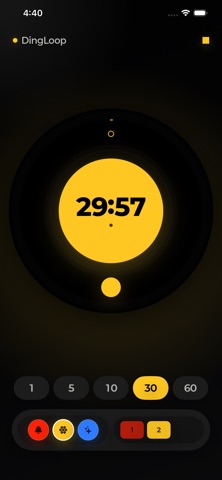
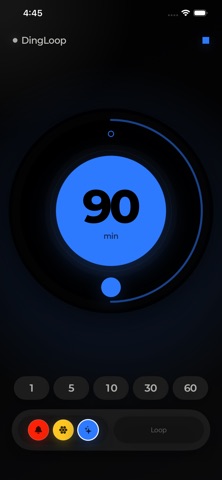
DingLoop is a simple loop alarm app designed to help you create and run repeating alarms with ease. With an intuitive dial, color buttons, and drag-based controls, you can build alarm loops without complicated settings. Set your desired time and start the alarm. DingLoop will repeat the alarm at the interval you choose. (Settings allows you to choose between two time units: minutes or seconds.) You can use alarm sounds marked by red, yellow, and blue, and each color can remember its own saved time. Drag alarm buttons into the loop area to repeat multiple alarms in order. For example, you can create your own alarm loop where a red alarm is followed by a yellow alarm, then a blue alarm. * DingLoop offers two modes. 1. Stop Mode uses AlarmKit on iOS 26 or later to show alarms on the Lock Screen, in the background, and during Focus modes. When an alarm rings, it stays active until you stop it. After stopping, DingLoop moves to the next alarm in the loop. This mode works well for activities where you do not want to miss an alarm, such as studying, workouts, work routines, and rest reminders. 2. Live Mode is a lighter repeating mode that plays sound only while the app is open. In this mode, alarm loops continue automatically without requiring a stop action, and you can also use a short voice recording as your alarm sound. It is well suited for activities where you keep the app open and want a gentle flow, such as stretching, breathing, creative work, cooking support, and short habit loops. * Key Features Repeating alarms from 1 minute up to 360 minutes Color-based alarm sounds with separate saved times Loop registration to run alarms in sequence Stop Mode for use on the Lock Screen and in the background Live Mode for lightweight repeating while the app is open Short voice recording alarms available in Live Mode Intuitive dial, color buttons, and drag controls Home Screen widget and Live Activity support
Latest release
What’s New
- You can now set the timer using either minutes or seconds. - The widget design is now cleaner. - In Basic Mode, the remaining time is now displayed while playing.
Audience growth
Ratings growth
Baseline captured. Growth appears after the crawler observes a changed rating count.
Momentum comes from crawler snapshots for the tracked storefront. “Viral growth signal” means unusually fast recent rating gains; it is an indicator, not download data.
Price tracking
Price intelligence
First snapshot captured. The trend line starts after the next crawler price observation.
- First observed Aug 20, 2026 · 2:24 PM Free
Screenshots