About this app
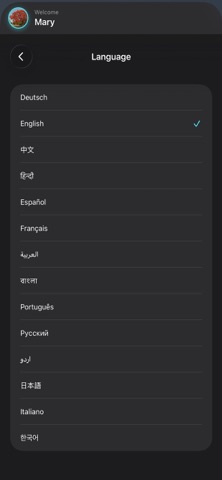
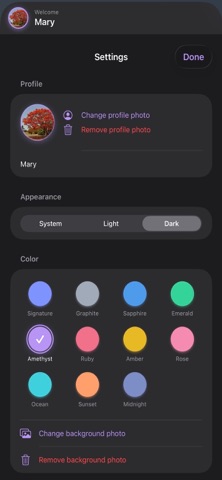
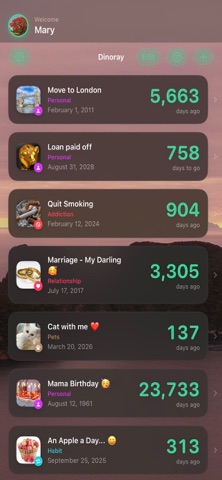
How long has it been? How long is left? Dinoray keeps both in view — the day you stopped, the anniversary coming up, and everything in between. COUNTING • Counts in both directions: "412 days ago" for the past, "34 days to go" for what is ahead • Anniversaries start over each year instead of climbing forever • A precise breakdown into years, months, weeks and days • Calculate the distance between two freely chosen events — with the total number of days • Optional time of day: the count then turns over a full 24 hours later, not at midnight • Always accurate across midnight, time zones and leap years • As many events as you like, with no limit SAVINGS • Add a daily amount — every day without becomes a visible sum • Made for everything you are giving up ORDER • Nine categories, each with its own colour and symbol • Sort by date or duration — or place every event freely with drag and drop • Filter by category, pin what matters • Title, date, category and photos can be changed at any time REMINDERS AND SHARING • Milestones you choose: 7 days, a month, a year — each one switchable • A daily reminder at the time of day you pick • Widgets for the home and lock screen • Turn any milestone into an image you can send • Share images with the logo, the date and the full breakdown — including the distance between two events • Recommend Dinoray to friends with a single tap PERSONAL • Editable photos for every event — crop, position and zoom • Profile photo and your own picture behind the event list • Light, dark or system • Eleven colour themes • 14 languages, right-to-left layout included YOUR DATA • Stored locally and, when iCloud is enabled, in your personal iCloud — no developer-operated servers • No ads, no tracking • Syncs through iCloud between your devices • Everything can be deleted at any time PRICE 7 days free, with no payment details. After that a single purchase — never a subscription. One purchase covers iPhone, iPad and Mac.
Latest release
What’s New
Version 3.1 makes custom ordering reliable and the controls clearer. • Switching to Custom Order now keeps the exact order that was visible beforehand • Older saved custom orders no longer shuffle the list • Sorting and language menus have a more polished, clearer design • New ninth category “Plan” with its own checklist icon and a distinctly darker turquoise • On iPhone and iPad, a compact checkmark ends reordering • The red status dot disappears after you tap Done • The inaccurate reordering hint has been removed on Mac • Available on iPhone, iPad, and Mac in all 14 languages
Audience growth
Ratings growth
Baseline captured. Growth appears after the crawler observes a changed rating count.
Momentum comes from crawler snapshots for the tracked storefront. “Viral growth signal” means unusually fast recent rating gains; it is an indicator, not download data.
Price tracking
Price intelligence
First snapshot captured. The trend line starts after the next crawler price observation.
- First observed Sep 1, 2026 · 1:54 PM Free
Screenshots