About this app
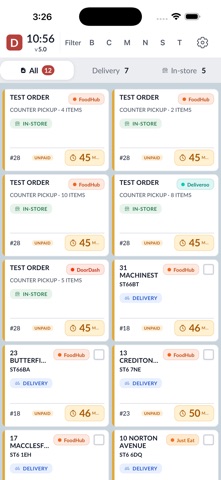
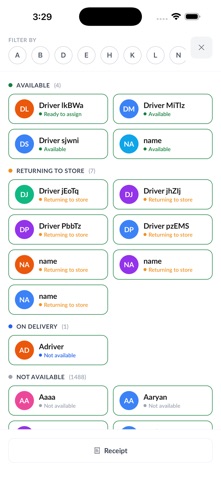
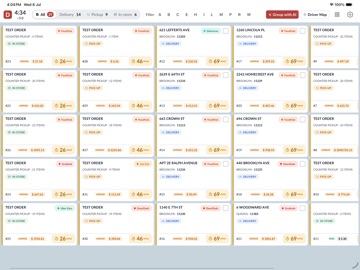
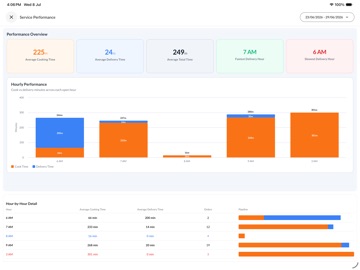
Dispatch Screen is the in-store operations app for Foodhub restaurants. It gives your kitchen and front-of-house team a live view of incoming orders, driver activity, and delivery progress — all in one place. Manage orders from start to finish • View orders across New, Cooking, Ready, and Out for Delivery stages • Mark orders ready and move them through your workflow quickly • See order details, customer information, and delivery addresses at a glance • Filter and sort orders to match how your team works Driver dispatch made simple • Assign drivers to single orders or multiple orders at once • View driver status on the home screen when enabled • Track which drivers are on delivery or returning • Use the map view to see orders and drivers on a live map Built for busy restaurant teams • Designed for tablets and in-store use during service • Real-time order updates so your board stays in sync • Print receipts and delivery labels when configured • Customisable settings for tabs, layout, service types, and display options Reports and insights • Access driver takings and store performance reports • Review order history and operational data to support your team Settings and control • Configure how orders are displayed and grouped • Manage account and device settings for your store • Adjust appearance, order management, and dispatch preferences Note: This app is intended only for registered Foodhub partners. To learn more or to become a partner, visit www.foodhub.com.
Latest release
What’s New
We've improved app performance, enhanced stability, fixed various bugs, and made several usability improvements to deliver a smoother and more reliable experience.
Audience growth
Ratings growth
Baseline captured. Growth appears after the crawler observes a changed rating count.
Momentum comes from crawler snapshots for the tracked storefront. “Viral growth signal” means unusually fast recent rating gains; it is an indicator, not download data.
Price tracking
Price intelligence
First snapshot captured. The trend line starts after the next crawler price observation.
- First observed Aug 20, 2026 · 4:02 PM Free
Screenshots