About this app
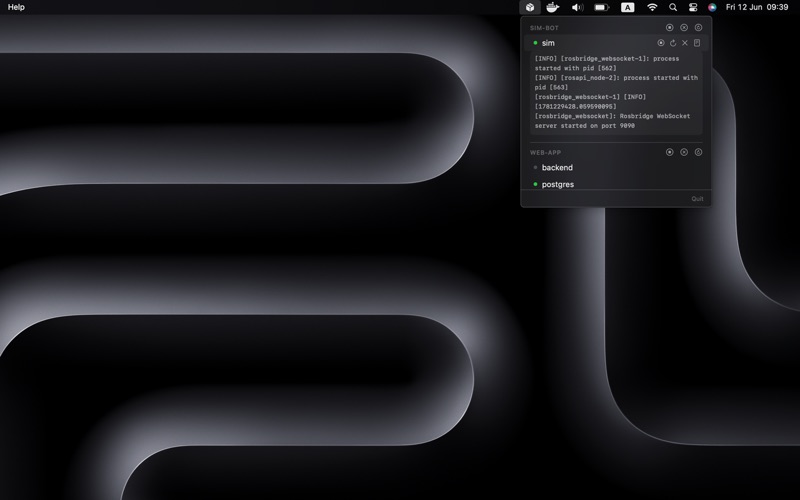
Stop opening Docker Desktop just to restart one container. Docker Menu Bar lives in your menu bar and gives you instant control over all your Docker Compose stacks — start, stop, restart, and tail logs without ever switching windows. -------------------- WHAT IT DOES -------------------- - Groups containers by Compose project — no more flat, unreadable container lists - Start, stop, and restart any service in one click - Compose Up, Down, Stop, and Restart entire stacks from the menu bar - Tail the last 20 lines of logs live — toggle per service, no terminal needed - Auto-refreshes every 3 seconds so you always see live state - Works with Docker Desktop and OrbStack on both Intel and Apple Silicon -------------------- BUILT FOR DEVELOPERS -------------------- Native Swift, zero Electron. No telemetry, no account required, no backend server. Your Docker socket never leaves your machine. Terms of Use: https://gist.github.com/hjatupon/4c455b16e694859e5e96540da2635d81
Latest release
What’s New
Live container stats and a smoother popover. - NEW: Live CPU and memory usage on every running container, updated every 3 seconds. CPU turns orange above 70% and red above 90%. - IMPROVED: The popover now stays exactly where it opened - no more jumping or clipped content when the macOS menu bar auto-hides. - FIXED: The inline log viewer no longer collapses on its own a few seconds after opening.
Audience growth
Ratings growth
Baseline captured. Growth appears after the crawler observes a changed rating count.
Momentum comes from crawler snapshots for the tracked storefront. “Viral growth signal” means unusually fast recent rating gains; it is an indicator, not download data.
Price tracking
Price intelligence
First snapshot captured. The trend line starts after the next crawler price observation.
- First observed Aug 29, 2026 · 7:44 PM $19.99
Screenshots