About this app
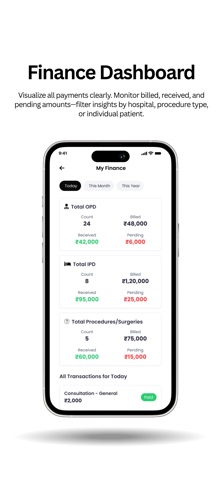
DocLogBook - Complete Log Management for Doctors DocLogBook is the ultimate logbook and practice management solution designed specifically for healthcare professionals to track all clinical activities, manage finances, and maintain professional records effortlessly. KEY FEATURES Comprehensive Medical Logs OPD (Outpatient Department) logs with patient details IPD (Inpatient Department) admission records Surgery logs with procedure details and outcomes Imaging records (X-ray, CT, MRI, Ultrasound etc.) Diagnostic procedure logs Consultation records All your medical activities tracked in one organized platform. Financial Tracking & Balance Management Track pending payments for each patient Monitor outstanding balances in real-time View payment history and financial summaries Calculate total revenue across different services Identify pending dues at a glance Generate financial reports for better practice insights Powerful Export Options Export logs to CSV format for spreadsheet analysis Generate professional PDF reports Select multiple logs and export together Choose different formats based on your needs Share reports via email, WhatsApp, or cloud storage Bulk export for research and documentation Smart Log Management Date-wise tracking of all activities Quick search by patient name, date, or procedure type Filter logs by category (OPD/IPD/Surgery/Imaging) View chronological history of your practice Organize logs by specialty or department Archive old records for easy retrieval Professional CV Sharing Create and maintain your professional profile One-click CV sharing feature Share your credentials instantly with colleagues or institutions Update qualifications, experience, and achievements Professional format ready for job applications Export CV as PDF Analytics & Insights Track total number of procedures performed Category-wise breakup of your practice Monthly and yearly statistics Financial performance reports Identify most common procedures Practice growth trends Multi-Format Data Export Excel-compatible CSV files Professional PDF documents Customizable report formats Batch export for multiple logs Easy integration with other tools Perfect for research publications and audits WHY DOCTORS CHOOSE DOCLOGBOOK All-in-One Solution: Track OPD, IPD, Surgery, and Imaging in one app Financial Clarity: Know your pending amounts and balances instantly Quick Sharing: Export and share logs in seconds Professional CV: Maintain and share your profile with one click Time-Saving: Reduce paperwork and administrative burden Always Accessible: Cloud-based access from anywhere PERFECT FOR General Practitioners Surgeons and Specialists Radiologists Consultants Resident Doctors Medical Students Healthcare Institutions GET STARTED TODAY Download DocLogBook now and experience the easiest way to maintain your medical practice logs, track finances, and share your professional credentials. SUPPORT We're here to help! Contact us at support@doclogbook.com for any assistance.
Latest release
What’s New
Improved Performance Enhanced Security
Audience growth
Ratings growth
Baseline captured. Growth appears after the crawler observes a changed rating count.
Momentum comes from crawler snapshots for the tracked storefront. “Viral growth signal” means unusually fast recent rating gains; it is an indicator, not download data.
Price tracking
Price intelligence
First snapshot captured. The trend line starts after the next crawler price observation.
- First observed Aug 19, 2026 · 10:53 AM Free
Screenshots