About this app
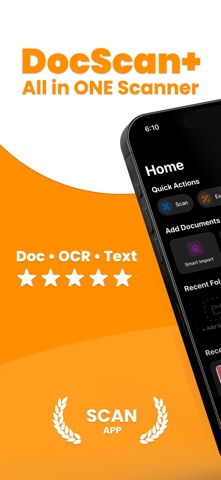
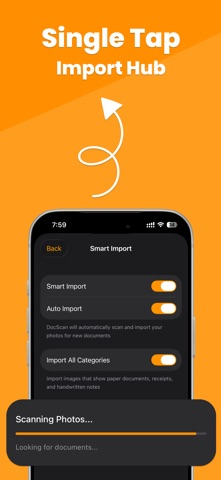
Introducing DocScan+ QR & PDF Scanner App, the ultimate document scanning solution that transforms your iPhone, iPad, Mac, and Vision Pro into a powerful portable scanner. Whether you're a student, professional, or simply need to digitize important documents, DocScan+ QR & PDF Scanner App makes scanning quick, easy, and secure. SMART DOCUMENT SCANNING • Scan documents instantly using your device's camera • Advanced edge detection automatically crops and straightens pages • Smart Import automatically detects and imports documents from your photo library • Automatic category detection organizes your scans (Receipts, IDs, Tax Forms, Handwritten notes) • Batch scan multiple pages into a single document • Import from Photos, Files, or scan directly SPECIALIZED SCANNERS • ID & Passport Scanner with optimized detection • QR Code Scanner with real-time detection and data extraction • Tax Form Scanner for financial documents • Text Extraction (OCR) with multi-language support • Handwriting detection for notes and journals SMART RECEIPT PARSING • Automatically extract merchant name, address, and contact info • Parse individual items with quantities and prices • Detect totals, discounts, tax, and tips • Extract VAT/BIN numbers and invoice details • Track loyalty points and payment methods • Perfect for expense reports and bookkeeping SMART ORGANIZATION • Automatic folder categorization • Create custom folders with icons and colors • Move documents between folders easily • Mark favorites for quick access • Search through all documents instantly • Grid and list view options PROFESSIONAL PDF EXPORT • Export scans as high-quality PDF files • Share via email, messaging, cloud storage, or AirDrop • Optimized file sizes without compromising quality • Perfect for contracts, receipts, notes, IDs, and more ICLOUD SYNC (PRO) • Seamlessly sync documents across all your Apple devices • Access your scans on iPhone, iPad, Mac, and Vision Pro • Signatures and settings sync automatically • Your documents are always up to date everywhere BANK-LEVEL SECURITY • Protect sensitive documents with Face ID and Touch ID • Lock individual documents for extra privacy • Your documents stay secure on your device • iCloud sync uses end-to-end encryption WORKS ACROSS ALL YOUR DEVICES • Native support for iPhone, iPad, Mac, and Vision Pro • Optimized layouts for every screen size • Seamless experience across the Apple ecosystem DocScan+ QR & PDF Scanner PRO FEATURES Upgrade to Pro for the complete scanning experience: • Unlimited document scans & PDF exports • Unlimited document storage • Smart Import from photo library • iCloud Sync across all devices • Signature management • Biometric security • Ad-free experience PERFECT FOR: • Students scanning notes, textbooks, and assignments • Professionals digitizing contracts, invoices, and receipts • Accountants tracking expenses and receipts • Travelers keeping digital copies of passports and IDs • Anyone needing to archive important documents • Home organization and paperless filing • Teams that need documents on multiple devices Have a question? Need assistance? Contact us at: https://docscan.rrad.ltd/contact Privacy Policy: https://docscan.rrad.ltd/privacy-policy Terms of Use: https://docscan.rrad.ltd/terms-of-use
Latest release
What’s New
We’re excited to bring you new updates in this version! • Fixes and improvements to make the app run better. If you’re enjoying the app, please consider rating us on the App Store — your support really helps
Audience growth
Ratings growth
Baseline captured. Growth appears after the crawler observes a changed rating count.
Momentum comes from crawler snapshots for the tracked storefront. “Viral growth signal” means unusually fast recent rating gains; it is an indicator, not download data.
Price tracking
Price intelligence
First snapshot captured. The trend line starts after the next crawler price observation.
- First observed Sep 1, 2026 · 1:54 PM Free
Screenshots