About this app
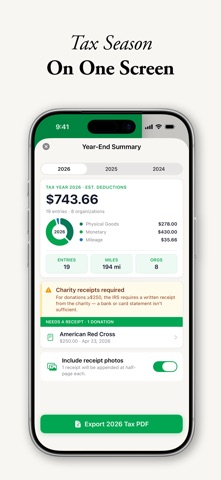
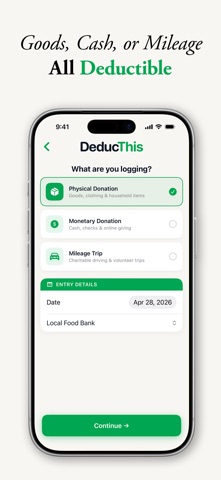
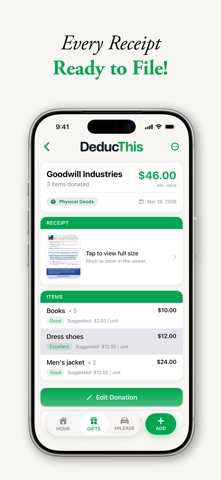
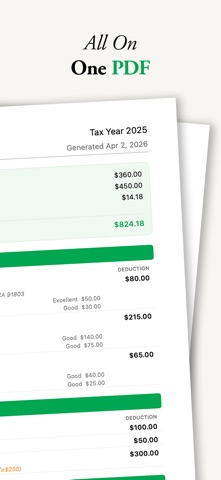
Track Donations. Maximize Deductions. DeducThis is the easiest way to document your charitable donations and mileage for IRS tax deductions. Whether you're dropping off a carload at Goodwill, writing a check to your favorite charity, or driving across town to volunteer, DeducThis keeps clean, organized records so you're ready at tax time, not scrambling. PHYSICAL DONATIONS Log clothing, furniture, electronics, and household goods with condition-based valuation suggestions based on IRS guidance. Just type the item name and DeducThis suggests a fair market value. Tap to apply. Add multiple items per donation, attach a receipt photo, and you're done. MONETARY DONATIONS Record cash, check, and card donations with charity name, amount, date, and optional notes. DeducThis automatically flags donations over $250 with a reminder that written acknowledgment from the charity is required by the IRS. CHARITABLE MILEAGE Log every charitable driving trip with organization, purpose, and miles. DeducThis calculates your deduction at the IRS standard charitable rate (14¢/mile) and tracks parking and tolls separately. Both are deductible. Prefer to track actual gas and oil costs instead? You can do that too. Check with your tax pro on which method fits your situation. STAY ORGANIZED Your donation log is grouped by year and sorted however you like: newest first, highest to lowest, or grouped by organization so you can see every gift, drop-off, and mile logged for a single charity in one place. The home dashboard shows your giving totals for this year, last year, and all time, plus charts that break down your deductions by type and month. RECURRING DONATIONS Set up monthly, quarterly, or annual recurring donations and DeducThis reminds you of what's coming up, so nothing falls through the cracks. SMART VALUATION HINTS Stop guessing what your donated items are worth. DeducThis includes a built-in valuation guide covering 87 categories of common household donations. Values scale by condition (Excellent, Good, Fair, Poor) so your records reflect reality. YEAR-END SUMMARY The home view pulls your whole year together at a glance: total deduction, this year vs. last year, and charts that break down where your giving went. One tap exports a tax-ready PDF, complete with IRS-thresholds notes for the $250, $500, and $5,000 filing rules. EXPORT YOUR RECORDS When you're ready to file, export your full year in one tap. DeducThis+ generates a clean PDF with a deduction summary, separate sections for physical, monetary, and mileage entries, and an appendix of every receipt photo. Prefer a spreadsheet? Export to CSV or TSV for Numbers or Excel. Preview any document inline before sharing. ICLOUD SYNC AND FAMILY SHARING DeducThis+ syncs your records across every iPhone signed into your Apple ID via iCloud. No accounts, no servers, no third parties. Married filing jointly? Share a single donation log with your spouse through Family Sharing. Both of you add entries, both of you see the total, each signed in under your own Apple ID. DEDUCTHIS+ Upgrade to DeducThis+ for unlimited entries, unlimited mileage tracking, PDF and CSV/TSV export with receipt photo appendix, receipt photo storage, iCloud sync, Family Sharing, per-organization summaries, advanced charts, and recurring donation tracking. BUILT FOR TAX SEASON DeducThis is built around IRS requirements, not a generic list app. Every detail is captured in the format you'll need at filing time. No ads, no analytics, no trackers. Your records live on your device and your private iCloud account. Nowhere else. This app does not provide tax advice. Consult a qualified tax professional for guidance specific to your situation. TERMS & PRIVACY Terms of Use (EULA): https://www.apple.com/legal/internet-services/itunes/dev/stdeula/ Privacy Policy: https://www.teselle.com/deducthis/privacy.html
Latest release
What’s New
Version 1.1.2 A steadier header. The DeducThis logo at the top used to dip down and bounce back every time you moved between Home, Gifts, and Mileage. It now stays put. Appearance switches right away. Changing between System, Light, and Dark used to leave the Settings screen itself on the old look until you closed and reopened it. It now changes the moment you pick. Plans listed lowest price first. The upgrade screen opens on Monthly and works up through Annual to Lifetime, so the least expensive option is the first one you see.
Audience growth
Ratings growth
Baseline captured. Growth appears after the crawler observes a changed rating count.
Momentum comes from crawler snapshots for the tracked storefront. “Viral growth signal” means unusually fast recent rating gains; it is an indicator, not download data.
Price tracking
Price intelligence
First snapshot captured. The trend line starts after the next crawler price observation.
- First observed Aug 24, 2026 · 8:53 AM Free
Screenshots