About this app
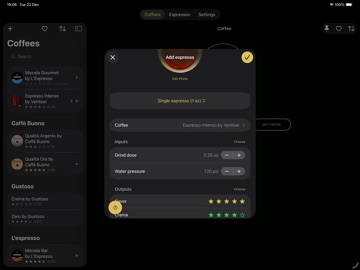
Here is Doppio, the coffee app for home baristas to efficiently keep track of your coffees and espressos - all in a beautiful and modern user interface. If you have a traditional espresso machine - for example a semi-automatic or a piston-driven espresso machine with a portafilter - and a grinder, this app is for you. Type of beans, grind dose, degree of grinding or tamping pressure are only a few of the variables that influence a good espresso. So, when dialling in your espresso, fine-tuning those parameters and keeping track of the outcome might be challenging. Doppio jumps in here and helps you brew your best espresso and keep track of it - and makes sure you don't forget about it. MANAGE YOUR COFFEES • Add your coffees • Define the brand and the name of each coffee • Add a photo to your coffee • Add additional information like price or custom notes to your coffee • Sort your coffees by brand, name, rating or price • Flag the coffees you love so that you can quickly find them afterwards • Pin the coffees you are currently using so that they are quickly accessible LOG YOUR ESPRESSOS • Add espressos of your coffees • Choose between common espresso types like single ristretto, single espresso, double ristretto or double espresso • Add a photo to your espresso • Add input and output criteria to your espresso (such as grind size, grind time, grind dose or extraction time) • Add ratings to your espresso (such as taste or crema) • Add custom notes to your espresso • Duplicate an existing espresso • Sort your espressos by date, rating or type • Use the built-in stopwatch to track and log the extraction time of your espresso RECREATE YOUR BEST ESPRESSO • Sort your coffees or your espressos by rating to find the best espresso of a coffee (or the best espresso in general) • Easily recreate your best espresso by referring to the existing ones and their input criteria MORE... • Use the predefined criteria (such as grind size, extraction time or taste) or add your own custom ones by choosing from the different types (rating, number, trend, duration, weight, free number or free text) • Share a list of your most preferred coffees • Export your espressos as CSV file • Get additional insights about your espressos (such as brew ratio or price) • Supports Dark Mode • Available in English, German and Italian
Latest release
What’s New
⎯ In this release Made under-the-hood optimizations and performed stability improvements. ⎯ 1.4.15 Doppio has been updated for iOS 26, in line with Apple's Liquid Glass design. ⎯ 1.4.12 Updated Doppio for iOS 18. In this context, Doppio now also offers an app icon for the dark and tinted display. ⎯ 1.4.11 A yes/no toggle has been added as a new input/output criterion. Also, a new yes/no standard input criterion "Puck screen" has been added (you can enable it under `Settings` > `Inputs`). In addition, criteria can now also be sorted (also under `Settings` > `Inputs`).
Audience growth
Ratings growth
Baseline captured. Growth appears after the crawler observes a changed rating count.
Momentum comes from crawler snapshots for the tracked storefront. “Viral growth signal” means unusually fast recent rating gains; it is an indicator, not download data.
Price tracking
Price intelligence
First snapshot captured. The trend line starts after the next crawler price observation.
- First observed Aug 24, 2026 · 10:33 PM Free
Screenshots