About this app
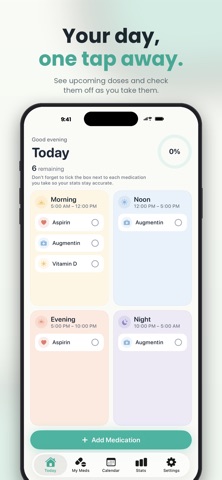
Dozly is a calm, beautifully designed medication reminder built for people who want to stick to their daily routine without the cold, clinical feel of typical health apps. KEY FEATURES Daily organizer See your whole day at a glance. Four soft-colored compartments — Morning, Noon, Evening, Night — group your medications the way you actually think about them. Smart reminders Get a gentle reminder exactly when each dose is due, with the medication name, amount, and whether to take it on an empty stomach or with food. A second nudge appears if you haven't confirmed within 10 minutes. Flexible schedules • Every day, same time • Multiple times a day (auto-distributed every 4, 6, 8, or 12 hours) • Specific weekdays • Specific days of the month • Custom intervals (every 2 days, every 3 days, etc.) Beautiful calendar view Look back at your week or month and see how consistent you've been. Color-coded dots make patterns easy to spot — green for all-taken days, yellow for partial, red for missed, and a soft outline for upcoming days. Stock tracking Tell Dozly how many tablets, capsules, or doses you have and we'll let you know before you run out. Plan-vs-stock warnings catch shortages early so you have time to refill. Insightful stats Streaks, weekly compliance, and time-of-day patterns help you understand your medication rhythm — and celebrate consistency. Quick-edit Tap any medication to fine-tune just the time and dose, without redoing the full setup. Designed for everyone • Works fully offline • No account required • Privacy-first: your medication data stays on your device • Full Turkish and English support • Accessible typography, soft palette, large touch targets Free to start. Premium unlocks unlimited medications, advanced statistics, and more. Terms of Use (EULA): https://www.apple.com/legal/internet-services/itunes/dev/stdeula/ Privacy Policy: https://umaiapps.com/dozly/privacy
Latest release
What’s New
Two new things in this update: • Water tracking — Count your daily water intake right from the home screen and see how close you are to your goal. • Mood & symptom journal — After taking a dose, note how you feel. Tag symptoms like headache, nausea or fatigue, and review the history for each medication on its detail page. Fully optional — skip it anytime. Plus small refinements and fixes. All your data stays on your device.
Audience growth
Ratings growth
Baseline captured. Growth appears after the crawler observes a changed rating count.
Momentum comes from crawler snapshots for the tracked storefront. “Viral growth signal” means unusually fast recent rating gains; it is an indicator, not download data.
Price tracking
Price intelligence
First snapshot captured. The trend line starts after the next crawler price observation.
- First observed Sep 14, 2026 · 5:23 PM Free
Screenshots