About this app
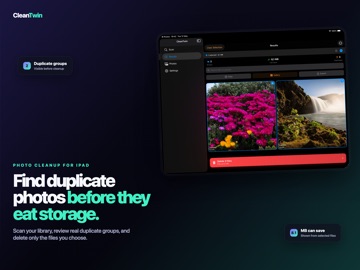
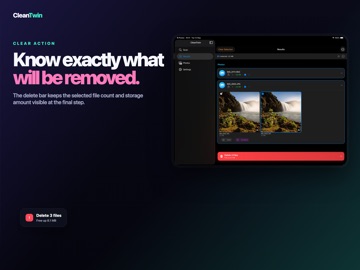
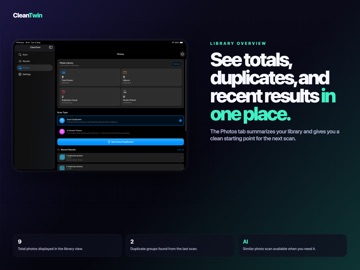
Storage full again? Photos app cluttered with duplicates, burst shots, and screenshots you forgot about? This duplicate cleaner finds every copy hiding in your photo library and across your Files app, so you can free up gigabytes in minutes instead of hunting through albums one by one. Built for iPhone and iPad. Optimized for huge libraries. Runs entirely on-device. WHAT IT FINDS Exact Duplicates. The fast hash engine catches byte-for-byte identical photos. Same shot saved twice, three times, ten times. Whether it came from a backup, a chat thread, or an import gone wrong, the duplicate finder spots it in seconds. AI Similar Photos. Vision AI compares photos visually, not just by file. Burst shots from the same second. Edited copies. Cropped versions. The same scene from slightly different angles. The neural matcher groups them so you can pick the keeper and clear the rest. Screenshot Cleanup. Hundreds of duplicate screenshots from web articles, receipts, and chats. The scanner targets the screenshots folder and surfaces duplicates fast, so your gallery stops looking like a hoarder's notebook. Files and iCloud Scanning. Pick any folder in the Files app, scan iCloud Drive, dig through a downloaded archive. Documents, PDFs, photos, anywhere duplicates pile up, the cleaner reaches them. HOW IT WORKS Pick what to scan: photo library, screenshots, or Files. Choose a mode: exact match or AI similarity. Review groups with side-by-side previews. Auto-select duplicates or pick your own. Delete and watch the gigabytes come back. Originals always stay protected. Deleted photos go to Recently Deleted first, so nothing is gone for good unless you say so. SMART FEATURES Adaptive Performance scans adjust to device state, so battery and heat stay in check. Memory Management handles tens of thousands of photos without choking. Gallery View shows large previews for quick visual confirmation. Auto-select pre-picks copies and keeps the best. The adjustable AI threshold lets you tune how strict the similar-photo matcher gets. Skip Hidden Files ignores system files and hidden folders. Dark and light themes match your iOS appearance. Scan notifications ping you when a long scan finishes. Performance tuning controls concurrent operations for your device. The iPad layout uses sidebar navigation and large previews, built for the bigger screen. BUILT FOR People who shoot a lot and review never. iPhone owners staring at the Storage Almost Full warning. Anyone prepping for an iOS update and short on space. iPad users with years of Files app downloads. Parents whose camera roll is 80 percent the same toddler photo. Designers and photographers who need clear space for new work. PRIVACY FIRST Everything runs on your device. No cloud processing, no photo uploads, no tracking. The AI runs locally using Apple's Vision framework. Your photos and files never leave your iPhone or iPad. Period. WHY THIS CLEANER Most duplicate finders catch the obvious copies and stop there. This one goes further. The AI catches near-duplicates that file-size matching can never see. The screenshot mode targets a folder most apps ignore. Files app integration covers iCloud Drive, downloads, and folders the Photos app cannot touch. Adaptive performance works as well on an iPhone SE as it does on an M-series iPad. Free scan included. See how much space you can recover before you commit. Premium unlocks unlimited cleanup, larger scan limits, and AI similarity scans across the full library. SUBSCRIPTION TERMS Payment is charged to your Apple ID at confirmation of purchase. Subscription auto-renews unless turned off at least 24 hours before the end of the current period. Manage subscriptions and turn off auto-renewal in your Account Settings. Terms of Use: https://www.apple.com/legal/internet-services/itunes/dev/stdeula/ Get your storage back. Keep what matters.
Latest release
What’s New
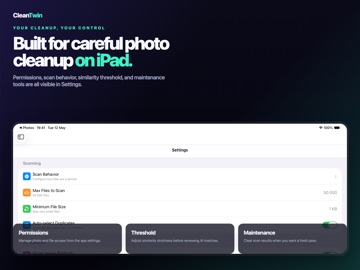
A faster, smarter, more trustworthy. We rebuilt the core to find more duplicates, protect your originals, and give you full control. Find more, miss nothing • Similar photos are now detected across your entire timeline, including bursts, edits, and look-alikes • Related photos are grouped together, with no duplicates across groups • Videos are now checked for duplicates too Your photos, your rules • Undo restores files and updates stats instantly • Original copies are always protected, including in full-screen comparison • Turn auto-select on or off depending on how much control you want Nothing happens behind your back • Clear alerts when items are only in iCloud and not scanned • New “Download from iCloud” option for full or offline scans • You can explore the app before granting photo access More control, less clutter • Exclude file types from folder scans • Optional low storage reminders • Simpler Settings with clearer options Under the hood • Lower memory usage, even with large photo libraries • Fixed rare crashes during photo analysis • Fixed issues deleting files from Files and iCloud Drive • Faster Photos tab and more accurate space estimates
Audience growth
Ratings growth
Baseline captured. Growth appears after the crawler observes a changed rating count.
Momentum comes from crawler snapshots for the tracked storefront. “Viral growth signal” means unusually fast recent rating gains; it is an indicator, not download data.
Price tracking
Price intelligence
First snapshot captured. The trend line starts after the next crawler price observation.
- First observed Aug 8, 2026 · 5:15 PM Free
Screenshots