About this app
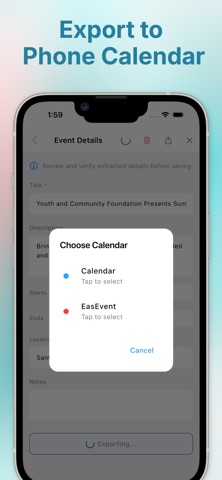
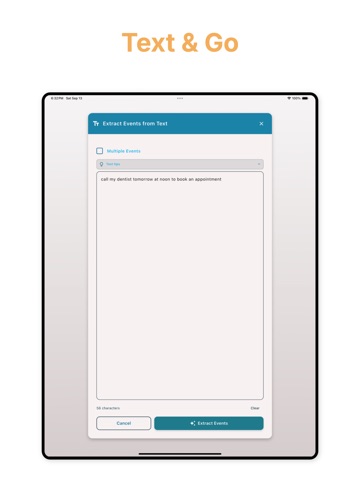
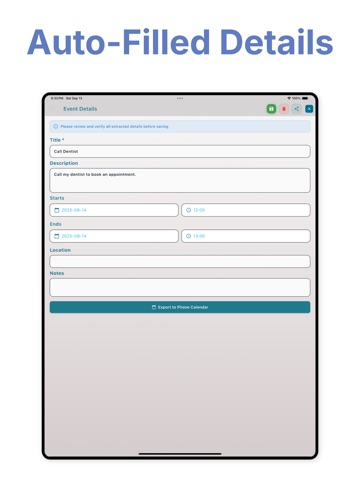
EasEvent is an AI calendar app that creates events from flyers, schedules, and natural speech automatically. Scan a timetable, import an image, or speak naturally. EasEvent extracts dates and times and adds them to your calendar in seconds. No manual typing. No complicated formatting. No missed details. Powerful Event Creation Features • Scan flyers and posters and convert them into calendar events • Import schedules and automatically extract every date and time • Create events from voice input or plain text • Bulk import full timetables in one step • Sync with phone calendar Whether you're managing school classes, work meetings, sports practice, or social events, EasEvent keeps your schedule organized and up to date. Designed for students, professionals, and busy families who want smarter scheduling without friction. Privacy Policy: https://easapps.tech/privacypolicy.html Terms of Use: https://www.apple.com/legal/internet-services/itunes/dev/stdeula/
Latest release
What’s New
UI improvement
Audience growth
Ratings growth
Baseline captured. Growth appears after the crawler observes a changed rating count.
Momentum comes from crawler snapshots for the tracked storefront. “Viral growth signal” means unusually fast recent rating gains; it is an indicator, not download data.
Price tracking
Price intelligence
First snapshot captured. The trend line starts after the next crawler price observation.
- First observed Aug 17, 2026 · 2:16 PM Free
Screenshots