About this app
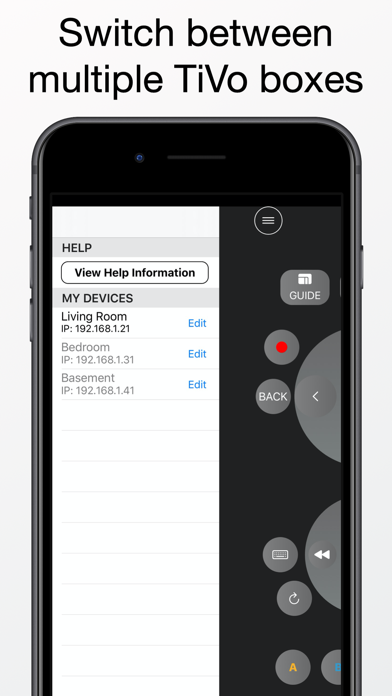
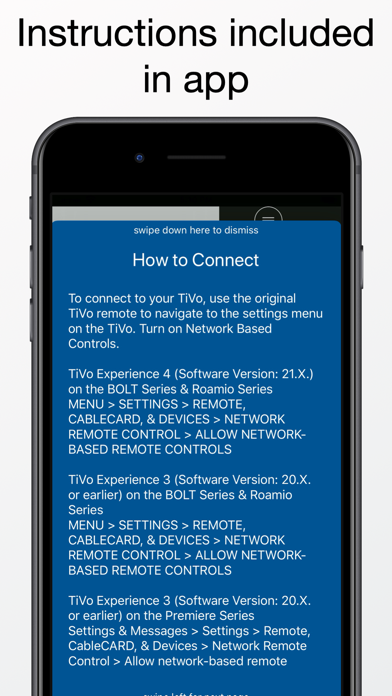
Easy Remote allows you to control your TiVo using your iPhone. You can navigate the guide, setup recordings, and play your stored shows. To get started, press the menu button (3 horizontal lines icon) at the top left of the screen. Please note that you must be connected to the same network as your TiVo box. Features - An easy to use and convenient button layout - QWERTY input by pressing the keyboard button - Automatic DVR device discovery A TiVo Series 3 or later is required. To connect, you will need to enable Network Remote Control. To enable Network Remote Control, go to MENU->SETTINGS->REMOTE & DEVICES -> NETWORK REMOTE CONTROL. From this menu, enable network-based remote controls. You will also need your IP address. The app is able to automatically detect the IP address when adding a new device. The IP address can also be obtained by going to MENU->SETTINGS->NETWORK SETTINGS. The IP address will be shown on the right side of the screen.
Latest release
What’s New
Thank you for your interest in the app. This version fixes menu item colors in dark mode.
Audience growth
Ratings growth
Baseline captured. Growth appears after the crawler observes a changed rating count.
Momentum comes from crawler snapshots for the tracked storefront. “Viral growth signal” means unusually fast recent rating gains; it is an indicator, not download data.
Price tracking
Price intelligence
First snapshot captured. The trend line starts after the next crawler price observation.
- First observed Aug 18, 2026 · 3:33 PM $1.99
Screenshots