About this app
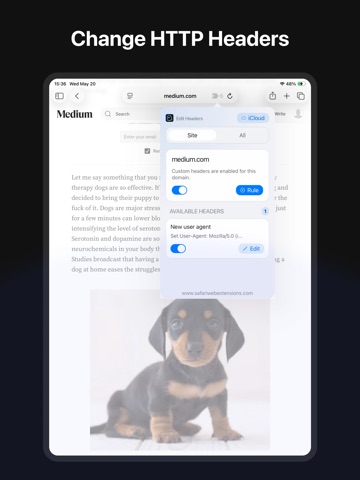
Edit HTTP Headers for Safari is a Safari extension that lets you create rules to set or remove HTTP request headers for specific websites. Use it when you need Safari to send a custom header before a page, script, image, iframe, stylesheet, font, media file, or XHR/fetch request loads. Features: · Create Custom Header Rules: Add HTTP header rules for the websites you choose. · Set Request Headers: Replace or add a header value before Safari loads a matching request. · Remove Request Headers: Remove selected headers from matching requests when you do not want them sent. · Per-Website Rules: Create different header rules for different domains. · Resource Type Controls: Choose exactly where a rule applies, including main pages, iframes, scripts, images, stylesheets, fonts, media, and XHR/fetch requests. · iCloud Sync: Keep your header rules synced across iPhone, iPad, and Mac. · Privacy-first design: No data collection, tracking, or logging, your browsing stays completely private. · Multilingual support: Use the extension in multiple languages for a globally friendly experience. · Clean, user-friendly UI: Enjoy a streamlined design that integrates smoothly into your workflow. · Seamless Safari integration: Built to work across Safari on macOS, iOS, and iPadOS. Common Uses: · Test Mobile User Agents: Send an iPhone, iPad, or desktop User-Agent header to test how a website responds. · Set Language Headers: Ask a website to show content in a different language by changing the language header. · Test API Requests: Add custom headers used by development, staging, or internal tools. · Debug Website Behavior: Compare how a site behaves when certain request headers are added, changed, or removed. · Remove Unwanted Headers: Stop selected headers from being sent to specific websites. · Per-Site Development Setup: Keep different header rules for different domains, test servers, or environments.
Latest release
What’s New
Bug fixes and performance improvements.
Audience growth
Ratings growth
Baseline captured. Growth appears after the crawler observes a changed rating count.
Momentum comes from crawler snapshots for the tracked storefront. “Viral growth signal” means unusually fast recent rating gains; it is an indicator, not download data.
Price tracking
Price intelligence
First snapshot captured. The trend line starts after the next crawler price observation.
- First observed Sep 25, 2026 · 6:25 AM $2.99
Screenshots