About this app
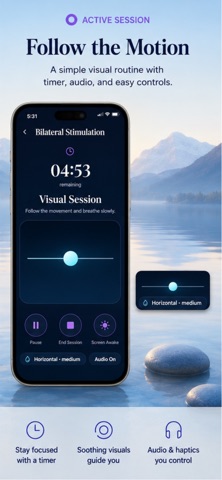
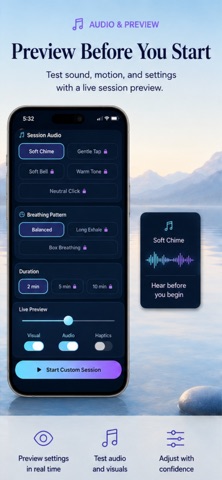
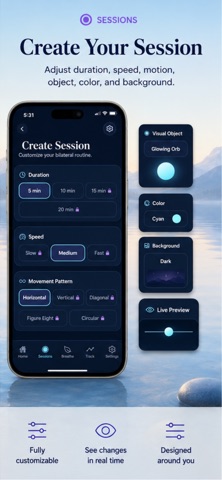
EMDR Therapy App provides a private and flexible set of bilateral stimulation tools for personal wellness and use alongside professional guidance. Create personalized visual, audio, and haptic sessions, adjust the movement and pacing, save your favorite configurations, and track your routine locally on your device. CREATE YOUR ROUTINE Choose sessions from 5 to 20 minutes and customize the speed, movement pattern, visual object, size, color, and background. Available movement patterns include horizontal, vertical, diagonal, figure-eight, and circular movement. A live preview lets you see your configuration before starting. During a session, you can pause, resume, enable or disable audio, control haptic feedback, keep the screen awake, or end the session at any time. STEREO AUDIO AND HAPTICS Choose from five built-in stereo tone pairs, including Soft Chime, Gentle Tap, Soft Bell, Warm Tone, and Neutral Click. Adjust the volume and alternation pace to create a comfortable experience. Optional timed vibration pulses provide an additional rhythmic stimulus. All sounds are included with the app and do not require streaming or an internet connection. Headphones are recommended for the intended left and right stereo experience. BREATHE AT YOUR OWN PACE Use the visual breathing timer whenever you want a quiet pause. Choose Balanced Breathing, Long Exhale, or Box Breathing and select a duration of 2, 5, or 10 minutes. The animated visual guide displays the current breathing phase, remaining time, completed cycles, and overall progress. Optional haptic cues can indicate each phase change. TRACK YOUR ROUTINE Review completed sessions, daily minutes, current streaks, and activity from the last seven days. Save personalized session configurations as presets and return to your favorite routines whenever you need them. After each session, you can optionally record how you feel, select an intensity level, and write a private reflection. Session details and reflections remain available in your local history. PERSONALIZED EXPERIENCE The Home screen changes automatically for morning, afternoon, and evening, providing a different visual atmosphere throughout the day. Choose between Light and Dark appearance and use Reduce Motion when you prefer a less animated experience. Configure your default duration, speed, audio, visual mode, and haptic preferences from Settings. IMPORTANT NOTICE EMDR Therapy App is a personal wellness utility that generates visual, auditory, and timed haptic stimulation. The app does not diagnose, treat, cure, or prevent any disease or condition. It does not provide psychotherapy, medical treatment, or individualized health recommendations. This app is not a substitute for advice, diagnosis, or treatment from a licensed mental health or medical professional. If you intend to use bilateral stimulation in connection with EMDR, trauma, or distressing memories, seek guidance from a properly trained professional and do not attempt to process traumatic memories alone. Stop immediately if you experience discomfort, dizziness, distress, disorientation, or other unwanted effects. Do not use the app while driving, operating equipment, or in any situation that requires your full attention. Further information EMDR Institute Inc. (Emdr.com) Eye Movement Desensitization and Reprocessing (Wikipedia.org) What is EMDR Therapy? (Emdria.org) Terms of Use: https://www.apple.com/legal/internet-services/itunes/dev/stdeula/ Privacy Policy: https://deisyapp.appmakerpro.website/privacypolicy.html
Latest release
What’s New
Version 3.0 introduces a complete redesign and a significantly expanded bilateral stimulation experience. New visual movement patterns, objects, colors, sizes, and backgrounds Five built-in stereo tone pairs with adjustable volume and pacing Optional timed haptic stimulation New breathing routines with animated visual guidance Saved presets and favorite configurations Session history, activity charts, streaks, and private reflections Dynamic Home screen for morning, afternoon, and evening New Light and Dark appearance modes Improved accessibility and Reduce Motion support Local data export and deletion controls Bilateral Pro with monthly, annual, and lifetime options General performance, navigation, and reliability improvements
Audience growth
Ratings growth
Baseline captured. Growth appears after the crawler observes a changed rating count.
Momentum comes from crawler snapshots for the tracked storefront. “Viral growth signal” means unusually fast recent rating gains; it is an indicator, not download data.
Price tracking
Price intelligence
First snapshot captured. The trend line starts after the next crawler price observation.
- First observed Aug 18, 2026 · 6:32 PM Free
Screenshots