About this app
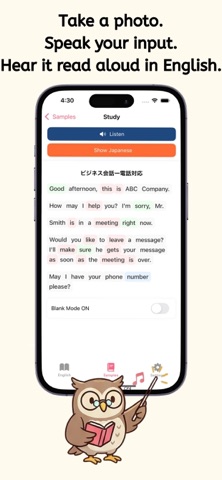
Point your camera at English text and start learning. English Word OCR turns photos into study material: extract text with OCR, listen to it read aloud, and memorize words - all in one app. WHO IT IS FOR - Learners who want to study the English they find in textbooks and reference books - Travelers who want to read signs and menus abroad - Anyone who finds making word lists tedious - Anyone who wants to learn pronunciation together with reading SCAN (OCR) Take a photo or pick one from your library, and the app turns English text into editable text with high accuracy. Retry with one tap if recognition fails. LISTEN AND LEARN (TEXT TO SPEECH) A native voice reads the text aloud while the current position is highlighted and scrolled automatically, so you can follow with your eyes and ears. Adjust the speed, pause, and stop anytime. Tap any word to hear its pronunciation. READ BY PART OF SPEECH (COLOR CODING) Nouns, verbs, and other parts of speech are shown in soft, distinct colors, so sentence structure is visible at a glance. Turn it on or off anytime. UNDERSTAND INSTANTLY (TRANSLATION) Show Japanese translations line by line with one tap. Results are saved, so you can review them offline later. YOUR OWN STUDY LIST Scanned texts are saved to My List. Organize them with search and swipe actions, and build your own textbook. SAMPLE LESSONS INCLUDED Classic stories, business English conversations, and everyday dialogue - start learning right after installing. KEEP GOING EVERY DAY - Study reminder notifications (choose your preferred time) - Summary of your streak, study time, and word count - Home screen widget to check progress at a glance Take one photo of the English around you. It is the first step toward reading English every day.
Latest release
What’s New
- Improved display stability - Minor bug fixes
Audience growth
Ratings growth
Baseline captured. Growth appears after the crawler observes a changed rating count.
Momentum comes from crawler snapshots for the tracked storefront. “Viral growth signal” means unusually fast recent rating gains; it is an indicator, not download data.
Price tracking
Price intelligence
First snapshot captured. The trend line starts after the next crawler price observation.
- First observed Aug 15, 2026 · 7:13 AM Free
Screenshots