About this app
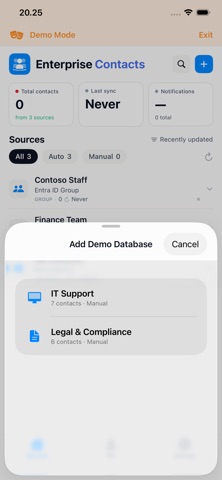
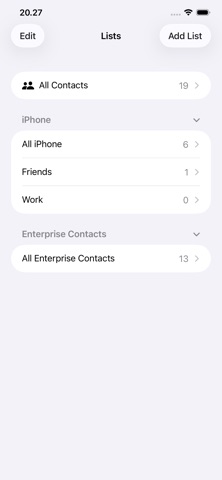
Enterprise Contacts keeps your organisation's directory always up to date — right inside the iOS Contacts app. Once set up by your IT admin, Enterprise Contacts automatically syncs contacts from Microsoft Exchange shared mailboxes, Entra ID security groups, and your own mailbox directly to your iPhone. Every phone call, message, or search in the native iOS Contacts app will find the right person immediately. KEY FEATURES - Native iOS Contacts integration — contacts appear in the built-in Contacts app, Phone app, and Messages, with no extra steps - Works with Microsoft 365 — uses your existing Microsoft account, no separate password required - Multiple contact sources — sync from shared mailboxes, Entra ID groups, or your personal Contacts folder - Set a background sync schedule to keep contacts up to date automatically — no need to open the app - Contact photos — profile photos from Microsoft 365 are downloaded and stored locally - Privacy first — contacts are stored on-device only; no data is sent to third parties - Demo mode — explore the app with sample data before connecting your account REQUIREMENTS - iPhone running iOS 18 or later - A Microsoft 365 / Entra ID account (provided by your organisation) - IT admin must approve the app in your organisation's Entra ID tenant (one-time setup) - No MDM or device enrolment required FOR IT ADMINS Enterprise Contacts is a multi-tenant Microsoft 365 app. After granting admin consent, create a security group named App_EnterpriseContacts_Config to configure which contact sources appear in the app. See the full setup guide at enterprisecontacts.eu.
Latest release
What’s New
• New: Chat or call a colleague in Microsoft Teams straight from their contact card. • New: Export diagnostics from Settings — a one-tap report for your IT support. Never includes contact content. • New: Cancel a running sync directly from the source card. • Fixed an issue that could show an incorrect "sources removed — access revoked" notification. • Sources that have never synced are now clearly highlighted, and setup guidance is clearer. • Faster recovery on unstable networks, plus reliability improvements throughout.
Audience growth
Ratings growth
Baseline captured. Growth appears after the crawler observes a changed rating count.
Momentum comes from crawler snapshots for the tracked storefront. “Viral growth signal” means unusually fast recent rating gains; it is an indicator, not download data.
Price tracking
Price intelligence
First snapshot captured. The trend line starts after the next crawler price observation.
- First observed Aug 24, 2026 · 8:53 AM Free
Screenshots