About this app
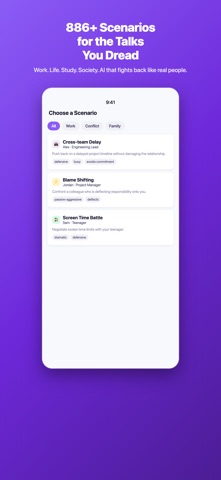
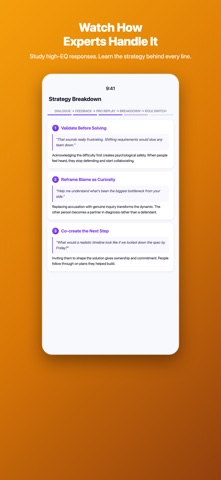
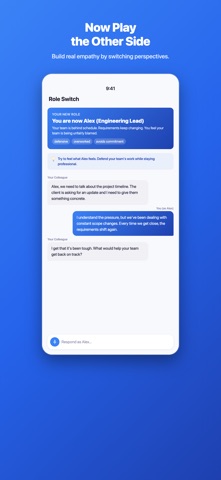
Your boss just scheduled a "quick chat." Your partner says "we need to talk." Your teenager just slammed the door. The conversation you've been dreading? It's happening. EQ Trainer lets you rehearse it first — with AI characters who push back, deflect, and guilt-trip just like real people. Then it shows you exactly what to say differently. 886+ scenarios. 6-phase training loop. Results you can feel in your next real conversation. 886+ REAL SCENARIOS YOU'LL ACTUALLY FACE • WORKPLACE: Push back on scope creep. Handle a micromanaging boss. Respond when someone steals credit. Navigate layoff talks. Set boundaries with overtime demands. Negotiate a raise. Confront a toxic coworker. • FAMILY & LIFE: Set boundaries with parents. Talk money with your partner. Handle teen screen time battles. Navigate caregiver conflicts. Deal with difficult neighbors. Wedding planning disagreements. Inheritance disputes. • CAMPUS: Group project freeloaders. Advisor disagreements. AI plagiarism accusations. Lab politics. Scholarship competition. Roommate conflicts. • SOCIETY: Bureaucratic nightmares. Online trolls. Neighbor noise disputes. Standing up to bias and stigma. Customer service escalations. Age discrimination. Each scenario features a distinct AI character with realistic personality — defensive, dismissive, guilt-tripping, passive-aggressive. They push back. They deflect. They gaslight. Just like real people. THE 6-PHASE TRAINING LOOP 1. DIALOGUE — Have a 3-5 turn conversation. Type, speak, or share a photo/video. 2. FEEDBACK — Line-by-line analysis of what worked and what didn't. 3. PRO REPLAY — Watch an expert handle the exact same situation. 4. STRATEGY BREAKDOWN — Learn the technique behind every line. 5. ROLE SWITCH — Play the other side. Build real empathy. 6. TRY AGAIN — Apply what you learned. See your improvement. WHY THIS WORKS Most communication advice tells you what to think. EQ Trainer shows you what to SAY — specific sentences, specific tones, in specific situations. Then it makes you practice until the words come naturally. AI SMART SEARCH Describe any situation in your own words. Our AI finds the most relevant scenario — even if you don't know the exact term. MULTIMODAL INPUT Share photos or short videos to add real-world context. The AI sees what you share and weaves it into the conversation. 26 INTERFACE LANGUAGES The app interface is available in English, Chinese (Simplified), Chinese (Traditional), Spanish, Japanese, Korean, French, German, Portuguese (Brazil), Italian, Russian, Arabic, Hindi, Indonesian, Thai, Vietnamese, Turkish, Dutch, Polish, Swedish, Danish, Finnish, Norwegian, Czech, Ukrainian, and Greek. Full scenario content — every dialogue line, character, and coaching note — is authored natively in eight of these: English, Chinese (Simplified), Chinese (Traditional), Japanese, Korean, Spanish, German, and French. In the remaining languages the interface is fully localized and scenarios are presented in English. PRO UNLOCKS EVERYTHING Free users get select scenarios across all categories. Pro gives full access to 886+ scenarios and every training phase. Terms of Use: https://eq-trainer.chatgptapp.store/terms Privacy Policy: https://eq-trainer.chatgptapp.store/privacy
Latest release
What’s New
What's new in v1.8: 18 new interface languages — EQ Trainer now speaks 26. Portuguese (Brazil), Italian, Russian, Arabic, Hindi, Indonesian, Thai, Vietnamese, Turkish, Dutch, Polish, Swedish, Danish, Finnish, Norwegian, Czech, Ukrainian and Greek join English, Chinese (Simplified & Traditional), Spanish, Japanese, Korean, French and German. Smarter language detection — on first launch the app now walks your full list of preferred device languages instead of giving up after the first miss. If your second choice is one we support, you get it. Fully localized messages — every error, network and status message is now translated. A handful of them previously appeared in English no matter your language setting. Fixes - Corrected a build-version mismatch between the app and its Home Screen widget - Added a missing Korean region entry that could leave some Korean text unresolved
Audience growth
Ratings growth
Baseline captured. Growth appears after the crawler observes a changed rating count.
Momentum comes from crawler snapshots for the tracked storefront. “Viral growth signal” means unusually fast recent rating gains; it is an indicator, not download data.
Price tracking
Price intelligence
First snapshot captured. The trend line starts after the next crawler price observation.
- First observed Aug 15, 2026 · 6:45 AM Free
Screenshots