About this app
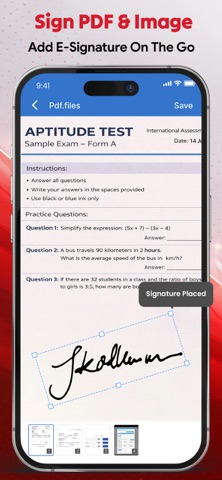
eSign – Sign PDF, PDF Reader & PDF Converter eSign: PDF Editor & Converter is the fastest, easiest, and most reliable app for signing PDF document, eSign images, and securely managing all your digital e-signatures. Sign PDF is deSigned for students, professionals, and freelancers. ESign lets you create, save, and reuse signatures without printing or scanning. Signing documents is now simpler, faster, and more convenient with eSign. Create an eSign with full customization: adjust font size, font color, background color, and swash style. Prefer a personal touch? Draw your signature manually, scan eSign with your camera, and save it for future use. All signed documents are organized for quick access, making your workflow paper-free and efficient. Sign PDF also works as a reader, editor, and converter of PDF all in one. You can merge multiple PDF files, convert documents with a PDF converter, scan files using your phone camera, and manage your saved documents effortlessly. With a PDF reader, easily view, share, rename, or delete files anytime, keeping your workflow seamless and organized. Our eSign app is perfect for students, professionals, and freelancers handling PDF document, contracts, reports, or assignments. Key Features of ESign: PDF Editor & Converter • Digital signature with font size, color, background & swash style • Scan e-signatures using your phone camera • Draw signatures manually • ESign PDF document & image • Save, view, reuse signatures • PDF reader for smooth viewing • Edit and manage PDFs easily. • Merge PDF document • Convert files to PDF • Manage documents: view, share, rename, delete Why ESign: PDF Editor & Converter? • Save time with auto and reusable signatures using eSign. • Quickly sign PDF documents and images without printing. • Edit files easily with the powerful PDF Editor. • View documents smoothly with the built-in PDF reader. • Convert files instantly using the smart PDF converter. • Scan papers in seconds with your phone camera quickly. • Organize every PDF document in one secure place. • Combine multiple files effortlessly with Merge PDF. How to Use ESign: PDF Editor & Converter ESign: Customize font size, color, background, and swash style. Scan: Capture and scan with camera. Draw Signature: Create manually on screen. Saved Signatures: Reuse signed documents anytime. ESign PDF & Images: Add signature, save instantly. PDF Editor: Edit, sign, and manage your documents in seconds. PDF Tools: PDF Reader—view smoothly. Merge PDF—combine multiple files. PDF Converter—from images or documents. PDF Editor—edit PDF files instantly. Saved Documents—view, share, rename, and delete. Scan—Digitize handwritten signatures via your phone camera. Download ESign: PDF Editor & Converter now to eSign PDF documents instantly, manage PDFs efficiently, and enjoy a fast, simple, paper-free workflow. By using this app you agree to: Privacy Policy: https://sites.google.com/view/technestitservices/esign/privacy-policy Terms of use: https://sites.google.com/view/technestitservices/esign/terms-of-use
Latest release
What’s New
Bug fixes & Improvements
Audience growth
Ratings growth
Baseline captured. Growth appears after the crawler observes a changed rating count.
Momentum comes from crawler snapshots for the tracked storefront. “Viral growth signal” means unusually fast recent rating gains; it is an indicator, not download data.
Price tracking
Price intelligence
First snapshot captured. The trend line starts after the next crawler price observation.
- First observed Aug 14, 2026 · 12:43 AM Free
Screenshots