About this app
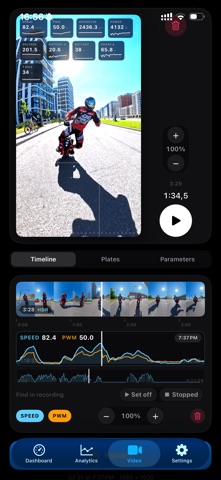
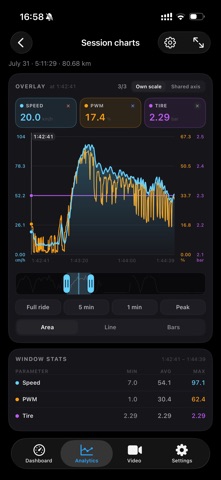
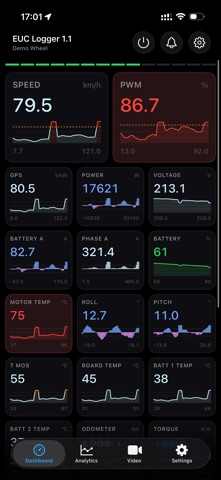
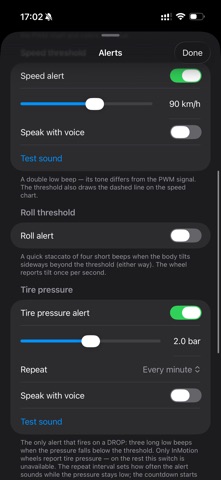
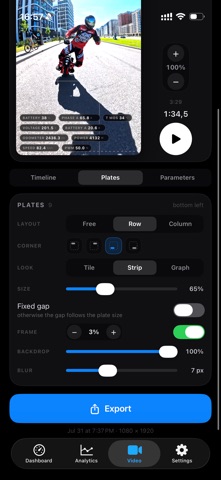
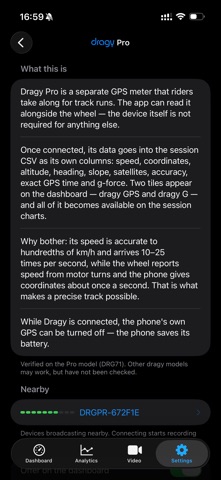
EUC Logger is a live telemetry dashboard and a black box for your electric unicycle. Connect over Bluetooth and ride: the app shows what the wheel is doing now, warns you out loud when it matters, and writes the whole ride to a file on your phone by itself. Afterwards, take the ride apart on charts — or put its numbers onto the video you shot. WHILE YOU RIDE • 26 wheel metrics as tiles — speed, PWM, power, voltage, currents, charge, temperatures, lean, odometer, both BMS packs — each with a chart and the session min and max below • The dashboard learns your wheel: tiles it never fills hide themselves, and a value it never sent shows a dash, never a zero. Pinch a tile to resize, hold to drag or hide it • When the link drops the screen says so: values turn to dashes and the chart breaks instead of freezing on a stale number WARNINGS YOU CAN HEAR • Six kinds: PWM, speed, lean angle, tire pressure (InMotion wheels only), link lost and link restored. Thresholds are per wheel, and PWM is on from the start, at 80 % • Each has its own sound, so you know which fired without looking — or the phone speaks it, in your own words • They sound with the silent switch on and the screen locked, ducking your music only for the beep • They are an addition to your wheel's own tiltback and beeper, never a replacement: the link can drop, the phone can be in a bag, iOS can shut down a background app RECORDING, WITHOUT BUTTONS • Recording starts by itself with the first frame of telemetry — no start button to forget, and a dropped link or an app restart neither ends the session nor splits the file • One line for every telemetry frame the wheel sends: a couple a second on some wheels, about twenty on others • 56 CSV columns, the first ten exactly the DarknessBot layout, so ride analyzers that read DarknessBot logs read these • Share any session from the app, even the one being recorded right now AFTER THE RIDE • Open any recording as a charts screen: up to three parameters at once, pinch to zoom, hold for a ruler, landscape for the widest view • Line, area or bars, min, average and max over your window, and the line breaking exactly where telemetry was silent TELEMETRY OVER YOUR VIDEO • Pick a clip from your library and one of your recordings — your numbers land on the footage, in as many plates as you like: tiles, strips or sparklines, placed where you want them • Outside the recording, or during a gap in it, a plate shows a dash — never a number it cannot stand behind • Up to 4K, H.264 or HEVC, presets for Reels, YouTube and 4K — one finished file with the plates already in it YOUR WHEELS • Every wheel keeps its own thresholds, settings and archive; the app reconnects to the last one by itself, and a switched-off wheel still opens — dashboard frozen, sessions, settings • Three protocol families, each verified on live hardware: InMotion V2 extended (InMotion P6), Begode-compatible (SmirnoV SV168), Veteran-compatible (NOSFET Aero) • Not on that list? Connect anyway: the protocol is worked out from the wheel itself, not its name, and in seconds you either see telemetry or read that nothing is coming • The app only reads — it never writes a setting to your wheel. An optional dragy DRG71 (Pro) GPS meter is read alongside it • No wheel at hand? Demo mode, behind the gear on the search screen, runs the whole app on a synthetic ride PRIVACY • Free: no account, no ads, no analytics, no third-party SDKs, nothing to buy • Rides and settings stay on your phone — no cloud copy, no backup, so export what matters to you • The phone's location is used for speed alone: no map, no track, one column in the file. A dragy meter, if you connect one, adds its own position columns to the file • The one thing that can leave the phone is a raw protocol capture for the developer: off by default, sent only when you tap Send iPhone, iOS 17 or later. English and Russian. Metric units only: km/h, V, A, W, °C, bar, km. euclogger.com
Audience growth
Ratings growth
Baseline captured. Growth appears after the crawler observes a changed rating count.
Momentum comes from crawler snapshots for the tracked storefront. “Viral growth signal” means unusually fast recent rating gains; it is an indicator, not download data.
Price tracking
Price intelligence
First snapshot captured. The trend line starts after the next crawler price observation.
- First observed Aug 19, 2026 · 5:55 PM Free
Screenshots