About this app
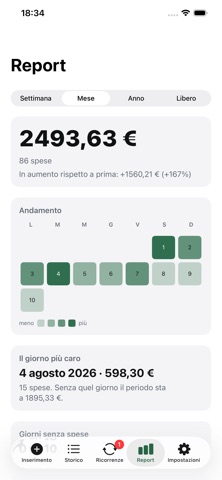
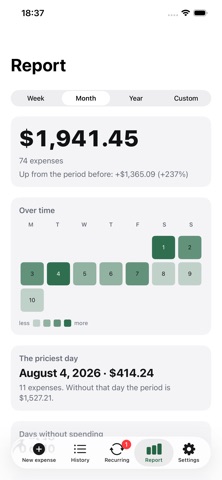
"EveryCent: Expenses" lets you record an expense the exact moment you make it, with as little hassle as possible. No forms to fill out at the register: a large keypad, the payment terminal, your card, and a note you can skip. Five taps - four if you use a recent combination. It even works offline. SUBSCRIPTIONS, FINALLY ALL IN ONE PLACE Netflix, your SIM card, insurance: everything that comes up every month or year is on a single screen, showing how much it actually costs per month. When a subscription is due, EveryCent doesn’t record anything on its own. It notifies you, and the expense is only added once you confirm it - with the due date, not the date of the tap. If the price has changed, it tells you: “It used to be €18.98; now it’s €1.01 more.” That’s why it’s worth keeping track of them. For each subscription, you can see its history: when you paid for it, how much, and how much it’s cost you in total. WHERE THE MONEY WENT A calendar where every day is a square, deeper where you spent more: empty days and heavy weeks show up without reading a single number. Below it you get the priciest day, and what the month would have been without it - the way to tell whether it really went wrong or just had one big bill. REALLY FAST Log an expense using the Action button, the Control Center, or by double-tapping the back of your iPhone. FORTY-FIVE LOOKS Fifteen color palettes and three visual styles that can be mixed and matched: the classic card, translucent glass, and two-color print. Choose the one that suits you, and change it whenever you like. YOUR DATA BELONGS TO YOU No account to create, no registration, no ads, no tracking. Your data stays on your iPhone and syncs with your iCloud: the app’s developer can’t see it and has no way of seeing it. You can lock the app with Face ID and export everything whenever you want into a file that you can open with any spreadsheet app. ALSO - Transaction history grouped by day, with searchable notes - The same card linked to multiple payment systems, without counting it twice - Reports by week, month, year, or custom period, with comparisons to a previous period - Due-date reminders, with a lead time of your choice (from 1 to 90 days) and the time of day they ring. Each subscription can have its own. - Italian and English Free, with no in-app purchases.
Latest release
What’s New
- "Contacts" page update.
Audience growth
Ratings growth
Baseline captured. Growth appears after the crawler observes a changed rating count.
Momentum comes from crawler snapshots for the tracked storefront. “Viral growth signal” means unusually fast recent rating gains; it is an indicator, not download data.
Price tracking
Price intelligence
First snapshot captured. The trend line starts after the next crawler price observation.
- First observed Aug 20, 2026 · 9:24 PM Free
Screenshots