About this app
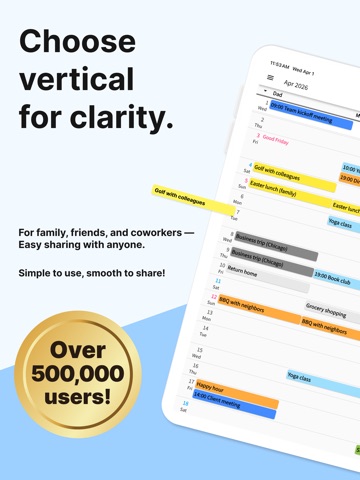
A shareable, easy-to-read vertical calendar! Share with family, friends, and groups! Easily share calendars with others. Push notifications and edit history mean you'll never miss a change. Previously entered schedules can be quickly re-entered from history! How to Use From the top-left menu, select "Edit Items" to register the people or items you want to manage. Long-press items to reorder them. When done, tap the Save button in the top right. On the vertical calendar screen, tap the intersection of an item and date to add a schedule. Previously added schedules can be quickly re-entered from history. Once saved, changes appear on the calendar. Use the arrow buttons (top right) to change months, or tap the calendar icon to jump to today. Added, edited, or deleted schedules can be reviewed in "Edit History" from the top-left menu. Long-press a schedule to quickly edit, move, copy, or delete it. To share your calendar, go to "Share this calendar with others" in the top-left menu, copy the share code, and send it to others. Recipients should download the app and enter the share code where indicated. Existing users can tap "Enter Share Code" from the menu. Each user can access up to 5 calendars. Switch, add, or remove calendars from the top-left menu. When schedules are added, edited, or deleted, all shared users receive push notifications. Disable notifications in iPhone Settings if needed. Per-calendar notification settings are available via the gear icon in the top-left menu. Messages Send messages to shared users. Type a message and tap Send to notify all users. Customize colors and senders. Long-press to copy or delete messages. Memories Tap the Memories tab and press Add to save memories with photos and text. Photos Up to 10 photos per month. Premium subscribers can save up to 50. Backup Your data is backed up on our servers. Save your account code to restore data when switching devices. Photos may be deleted if the calendar is inactive for over a year.
Latest release
What’s New
You can now create schedules that span multiple days. Tap the “Range” button when entering a schedule. Please ask the people you share your calendar with to update the app to the latest version.
Audience growth
Ratings growth
Baseline captured. Growth appears after the crawler observes a changed rating count.
Momentum comes from crawler snapshots for the tracked storefront. “Viral growth signal” means unusually fast recent rating gains; it is an indicator, not download data.
Price tracking
Price intelligence
First snapshot captured. The trend line starts after the next crawler price observation.
- First observed Sep 13, 2026 · 12:09 PM Free
Screenshots