About this app
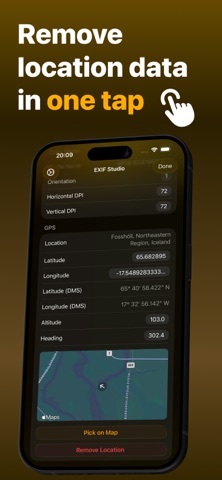
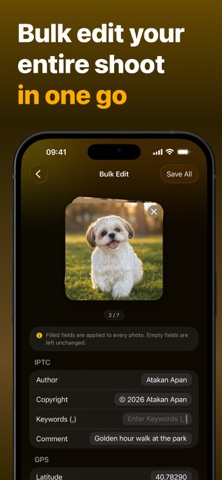
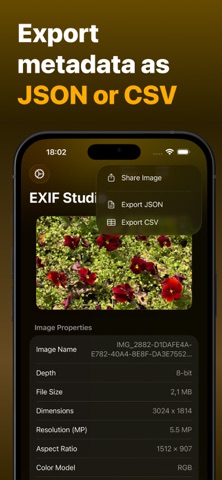
Unlock the hidden data in your photos with a powerful, professional-grade metadata tool. EXIF Metadata Studio is not just a viewer; it is a professional-grade editor, privacy shield, and AI detection tool all in one. Whether you are a photographer managing copyright, a developer analyzing image data, or a privacy-conscious user removing GPS tracking, this app puts you in full control. Pro Metadata Editor (60+ Fields) Edit and correct over 60+ technical tags. Perfect for organizing your library or fixing scanner errors. • Dates & Time: Fix incorrect "Date Taken" or "Date Digitized" timestamps. • Camera Data: Edit ISO, Aperture (F-Number), Shutter Speed, Focal Length, and Lens Model. • IPTC & Copyright: Add your Author Name, Copyright, Description, Title, and Keywords/Tags to protect your work. • TIFF Data: Modify Camera Make, Model, and Software fields. Advanced AI Image Detection (Unique Feature) Unlike standard EXIF viewers, EXIF Metadata Studio deeply analyzes AI-generated images. • View Generation Parameters: See the exact Prompt, Negative Prompt, Seed, Model, Sampler, Steps, CFG Scale, and Clip Skip used to create the image. • Detect AI Sources: Automatically identify if an image contains digital generation signatures. • PNG Text Chunks: Read raw text chunks embedded in PNG files. Privacy & Location Remover Your photos can reveal exactly where you live or work. • Remove GPS: Strip location data in one tap before sharing on social media. • Total Clean: Remove all metadata (EXIF, TIFF, IPTC) to export a safe, clean file. • No Tracking: All processing happens offline on your device. We collect no data. GPS Map Editor & Geotagging Don't just delete location data—fix it with precision. • Interactive Map Picker: Drag a pin on the map to set a new location for your photos. • Edit Coordinates: Manually adjust Latitude, Longitude, Altitude, and Heading (Image Direction). • Address Lookup: Automatically sees the reverse-geocoded address (City, Country) for any pinned location. Professional Workflow Tools Built for power users who need speed. • Copy & Paste Metadata: Copy full metadata from one photo and apply it to another in seconds. • Export Data: Export metadata reports as JSON or CSV files for external analysis. • Multi-Format Support: Full read/write support for HEIC, JPG, PNG, TIFF, and RAW formats. • Visual Inspector: View technical specs like Depth (8-bit/16-bit), Color Model (RGB), DPI, and Resolution. Download EXIF Metadata Studio today and see exactly what your images are carrying! Terms of Use: https://www.apple.com/legal/internet-services/itunes/dev/stdeula/ Privacy Policy: https://exifstudio.atakanapan.com/privacypolicy
Latest release
What’s New
- Shift Dates: Fix a wrong camera clock in one move. Shift the capture dates of up to 30 photos at once by days, hours, and minutes in bulk editing. - Bug fixes and performance improvements.
Audience growth
Ratings growth
Baseline captured. Growth appears after the crawler observes a changed rating count.
Momentum comes from crawler snapshots for the tracked storefront. “Viral growth signal” means unusually fast recent rating gains; it is an indicator, not download data.
Price tracking
Price intelligence
First snapshot captured. The trend line starts after the next crawler price observation.
- First observed Aug 26, 2026 · 5:43 PM Free
Screenshots