About this app
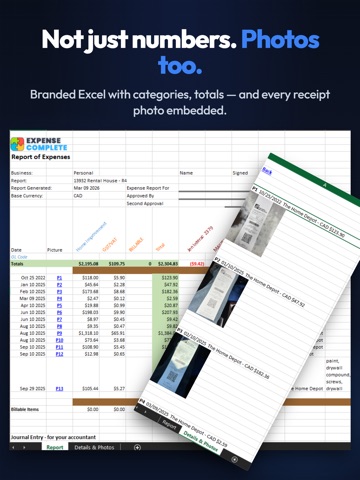
Expense Complete makes expense tracking effortless. Snap a photo of any receipt and our AI instantly extracts the merchant, date, total, tax, line items, and more — so you never have to type a thing. Smart Receipt Scanning Take a photo or upload a PDF. Our AI reads the receipt and fills in every detail automatically, including individual line items and tax breakdowns. Multi-Entity Support Manage expenses across multiple businesses, properties, or projects. Each entity maintains its own receipts, merchants, and reports. Automatic Mileage Tracking Drive and we'll handle the rest. Expense Complete detects your trips automatically in the background and logs the mileage — no need to start or stop a timer. You can also log trips manually by distance or odometer readings. All mileage is calculated at your configured rate and included in expense reports alongside receipts. Expense Reports Group receipts into reports by date range and entity. Export polished Excel reports with receipt photos, line items, and totals — ready for your accountant or reimbursement. Email Forwarding Forward receipts from your inbox to your dedicated Expense Complete email address. They're processed automatically — no manual upload needed. Full Data Export Export all your data anytime in JSON, CSV, Excel, QIF, or as a complete file archive. Your data is always yours. Additional Features • Organize by categories, merchants, and payment methods • Multi-currency support with automatic exchange rates • Attach supplementary documents to any receipt • Sign in with Apple, Google, or email • Delete your account and all data at any time from Settings Auto-Renewable Subscription Terms Expense Complete offers auto-renewable subscriptions to unlock full functionality Payment will be charged to your Apple ID account at confirmation of purchase. Your subscription automatically renews unless auto-renewal is turned off at least 24 hours before the end of the current billing period. Your account will be charged for renewal within 24 hours prior to the end of the current period at the same rate. You can manage your subscriptions and turn off auto-renewal in your device Settings > Apple ID > Subscriptions. Any unused portion of a free trial period, if offered, will be forfeited when you purchase a subscription. Privacy Policy: https://expensecomplete.com/privacy.php Terms of Use: https://expensecomplete.com/terms.php
Latest release
What’s New
- Export reports by month, quarter, or annually - New duplicate detection indicator when adding expenses - Subtotals now calculate correctly - Download button works again on closed reports
Audience growth
Ratings growth
Baseline captured. Growth appears after the crawler observes a changed rating count.
Momentum comes from crawler snapshots for the tracked storefront. “Viral growth signal” means unusually fast recent rating gains; it is an indicator, not download data.
Price tracking
Price intelligence
First snapshot captured. The trend line starts after the next crawler price observation.
- First observed Aug 6, 2026 · 12:28 AM Free
Screenshots