About this app
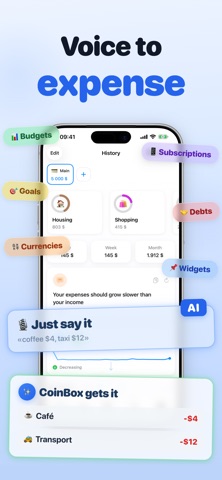
Hey! Ever wonder where your money actually goes? I did, so I built an app where you can log expenses in a second and instantly see the full picture of your finances. Key features: • AI Voice Input — say "coffee 4, cab 12, lunch 15" and all three transactions get added at once. The AI figures out the category, amount, and currency on its own. Works in 30+ languages and understands natural speech. The fastest way to track your spending • Accounts — split your money across cards, cash, and savings. Full control over your finances • Income tracking — add your salary, side gigs, and any other money coming in. See the full picture: how much you earned and how much you spent • Monthly budgets — set limits for categories and watch your progress in real time • Goals — saving up for something? Create a goal and track your progress • Subscriptions — all your recurring payments in one place. See exactly how much goes out every month • Debt tracking — keep track of who owes you and who you owe. All in one place • Travel mode — switch to a local currency and expenses convert automatically • Clean and minimal — simple design, everything works fast and smooth • Stats — spending by category and month, nice and clear • Month comparison — see how your spending changed compared to last month • Widgets — income, spending trend, financial tips — put what matters on your home screen • Custom categories — set them up your way, archive the ones you don't need • Powerful search — find transactions by notes, categories, amounts, and dates • Extra currencies — add up to 3 currencies with automatic conversion • Smart notifications — reminders that adapt to your habits • Customizable interface — choose widgets, set up your tab bar, change the app icon, pick your keyboard • CSV import and export — bring in data from other apps or save a backup Thanks for reading all the way down here! If you have ideas or suggestions, feel free to reach out — there's a "Send Feedback" button right in the settings.
Latest release
What’s New
Hey! What's new in this update: • New "This week" widget — daily spending Mon–Sun as a dotted bar chart. • "Add expense" button in Control Center and on the Lock Screen (iOS 18+) — log a spend in one tap. • You can now set a default currency per category — adding an expense in the right currency is faster. • Empty widgets are now tappable and open the right section of the app. • Widget gallery previews now show categories and currency in your language. • Fixed a bunch of bugs and improved stability. Thanks for using CoinBox!
Audience growth
Ratings growth
Baseline captured. Growth appears after the crawler observes a changed rating count.
Momentum comes from crawler snapshots for the tracked storefront. “Viral growth signal” means unusually fast recent rating gains; it is an indicator, not download data.
Price tracking
Price intelligence
- First observed Aug 19, 2026 · 10:06 AM Free
Screenshots