About this app
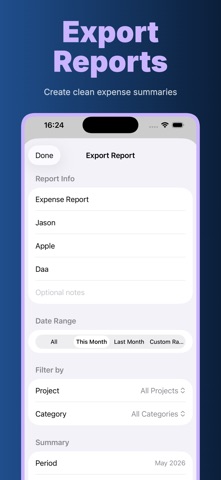
Expense Report Maker helps you capture receipts, organize expenses, and build reimbursement-ready reports without turning a small admin task into a spreadsheet project. It is made for business travel, client visits, freelance work, field service, small teams, contractors, consultants, and anyone who needs a clear record of what was spent, when it happened, and which project or category it belongs to. An active subscription is required to use Expense Report Maker. After subscribing, you can record expenses, scan receipts, organize reports, and export your data when needed. Add an expense in seconds with a description, amount, date, category, project, notes, and an optional receipt image. Use the camera to scan a paper receipt or choose an image from your photo library. On-device OCR can read receipt text and suggest the merchant name, total amount, purchase date, and expense category, so you spend less time typing and more time checking that the report is accurate. Built-in categories cover common business spending: Travel, Meals, Fuel, Hotel, Parking, Taxi, Office, Supplies, Software, Client, Equipment, and Misc. You can keep everything under a General project or create project names for clients, trips, departments, jobs, events, or monthly budgets. The main expense list is grouped by month, with a compact total bar that shows overall spending and category totals at a glance. When it is time to prepare a report, Expense Report Maker gives you practical export options. Filter expenses by month, project, category, or a custom date range. Add report details such as title, submitter name, company name, client or project name, and report notes. Export a summary PDF for quick reimbursement, a detailed PDF that includes receipt images, or a CSV file that can be opened in spreadsheet apps and accounting workflows. Key features: • Fast manual expense entry • Receipt photo attachment from camera or photo library • OCR-assisted receipt recognition for amount, merchant, date, and category • Month, project, and category filters • Category totals and overall total on the expense list • Custom projects for clients, trips, departments, or jobs • Notes field for extra context, approval details, or reimbursement comments • Summary PDF export • Detailed PDF export with receipt images • CSV export for spreadsheets and bookkeeping • Report title, submitter, company, client/project, period, and notes • Currency support for USD, EUR, GBP, JPY, CNY, CAD, and AUD • Active subscription required to use the app • Local storage on your device • No account required for everyday tracking Privacy matters when receipts may contain card fragments, addresses, employee names, hotel stays, meals, or client details. Expense Report Maker is designed around local-first record keeping. Your saved expenses and receipt images are stored on your device, and receipt recognition runs on device using Apple technology. You stay in control of what you save, edit, delete, export, and share.
Latest release
What’s New
• Added subscription access for using the app • Fixed bugs and improved stability
Audience growth
Ratings growth
Baseline captured. Growth appears after the crawler observes a changed rating count.
Momentum comes from crawler snapshots for the tracked storefront. “Viral growth signal” means unusually fast recent rating gains; it is an indicator, not download data.
Price tracking
Price intelligence
First snapshot captured. The trend line starts after the next crawler price observation.
- First observed Aug 11, 2026 · 8:03 AM Free
Screenshots