About this app
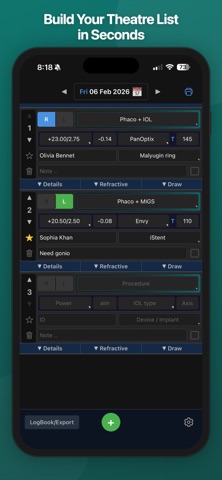
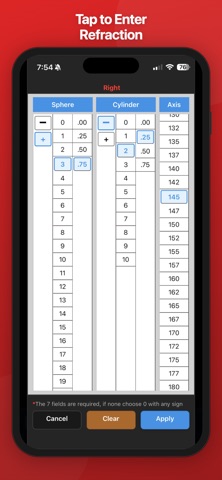
EyeList is a surgical logbook and planning tool for ophthalmologists who want to plan cases clearly and document their work in one place. Unlike logbooks that are completed only after surgery, EyeList supports the full workflow—from pre‑op planning through post‑op documentation—so your record reflects how you actually work in clinic and theatre. Designed to minimise manual entry, EyeList uses structured fields and drop‑down selections so you can capture cases quickly and consistently without repetitive typing. Key features Plan and log surgical cases in one workflow Build daily surgery lists by date, reorder cases, star cases, and mark cases done Structured data entry with predefined options and favourites Record procedure type, eye, IOL (including toric), device, surgeon role, hospital, and notes Document VA/refraction and key planning/outcome fields (including refractive planning where relevant) Review past cases in a logbook view, filter by procedure, and jump back to the original day Export your logbook to Excel/CSV and share PDFs for your records Access EyeList allows you to try the app with a limited number of cases. An annual subscription unlocks unlimited case logging and future updates. Subscription Payment is charged to your Apple ID at confirmation of purchase. Subscriptions renew automatically unless cancelled at least 24 hours before the end of the current period. You can manage or cancel your subscription in App Store account settings. Privacy & disclaimer Your data is stored locally on your device, with optional backups (including iCloud Drive on iOS when enabled). EyeList is intended as a personal surgical logbook and planning aid for ophthalmology professionals. It does not provide diagnostic or treatment recommendations. Terms of Use: https://www.optilima.com/eyelist-terms.html Privacy Policy: https://www.optilima.com/eyelist-privacy.html
Latest release
What’s New
UI improvement
Audience growth
Ratings growth
Baseline captured. Growth appears after the crawler observes a changed rating count.
Momentum comes from crawler snapshots for the tracked storefront. “Viral growth signal” means unusually fast recent rating gains; it is an indicator, not download data.
Price tracking
Price intelligence
First snapshot captured. The trend line starts after the next crawler price observation.
- First observed Aug 19, 2026 · 9:42 AM Free
Screenshots