About this app
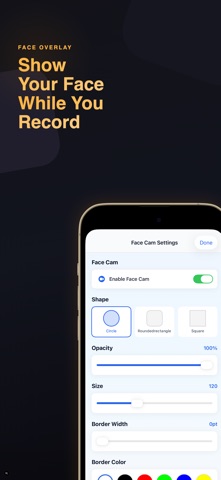
FaceCam is the ultimate screen recording app with face camera overlay. Record your screen while showing your face — perfect for tutorials, reactions, gaming videos, presentations, and more. Just tap record, and FaceCam handles the rest. Whether you're creating content, teaching online, or presenting to clients — FaceCam gives you professional-quality recordings with your face camera seamlessly overlaid. No expensive equipment needed. No complicated setup. Record smarter, create better, share faster. — SCREEN RECORDING — - Face Camera Overlay: Record your screen with a customizable face cam bubble. Adjust size, position, and shape to match your style. Perfect for tutorials, reactions, and walkthroughs. - Camera Roll Recording: Add your face camera overlay to existing videos from your camera roll. Great for reaction videos and commentary. - Picture-in-Picture: Your face stays visible in a floating window while you record any app or content on your screen. - High Quality Capture: Record in crisp quality with smooth frame rates. Capture every detail of your screen and face camera. — CREATIVE TOOLS — - Drawing Tools: Annotate your screen in real time while recording. Draw arrows, circles, highlights, and freehand sketches to emphasize key points. - Text Overlay: Add titles, captions, and labels to your recordings. Customize font, size, color, and position for professional results. - Pointer Tool: Highlight your cursor movements for presentations and tutorials. Make it easy for viewers to follow along. - Teleprompter: Read your script while recording. The built-in teleprompter scrolls at your pace so you never lose your place. Perfect for presentations and scripted content. — LIVE STREAMING — - RTMP Streaming: Stream live to any RTMP-compatible platform. Go live on your favorite streaming services with face camera overlay. - Web Recorder: Record browser content directly within the app. Capture web pages, online meetings, and web-based presentations. — VIDEO LIBRARY — - Video Management: All your recordings organized in one place. Browse, preview, and manage your video library effortlessly. - Export Options: Export recordings in multiple formats and quality settings. Choose the perfect balance of file size and video quality. - Easy Sharing: Share your recordings directly to social media, messaging apps, or cloud storage with just a few taps. — LEGAL — Terms of Use: https://leanstudio.asia/terms-of-use Privacy Policy: https://leanstudio.asia/privacy-policy Start creating professional screen recordings today with FaceCam — your face, your screen, one tap.
Latest release
What’s New
What's New: - Improved screen recording stability - Enhanced face camera overlay performance - Better live streaming reliability - Optimized video export quality - Bug fixes and improvements Questions? support@leanstudio.asia
Audience growth
Ratings growth
Baseline captured. Growth appears after the crawler observes a changed rating count.
Momentum comes from crawler snapshots for the tracked storefront. “Viral growth signal” means unusually fast recent rating gains; it is an indicator, not download data.
Price tracking
Price intelligence
First snapshot captured. The trend line starts after the next crawler price observation.
- First observed Aug 16, 2026 · 1:24 AM Free
Screenshots