About this app
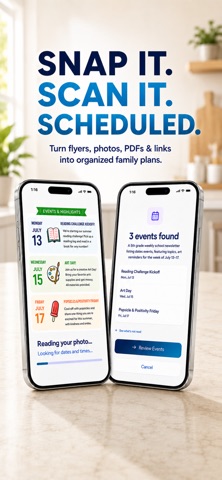
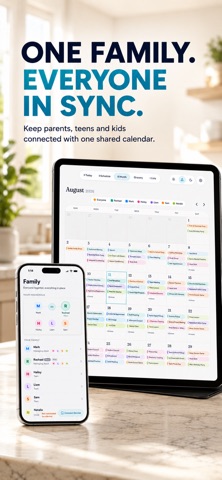
familiSync helps busy families turn scattered information into one shared plan. School flyers. Sports schedules. Emails. Screenshots. Appointment cards. Chores. Meal ideas. Grocery lists. Work schedules. Family information shows up everywhere—familiSync helps bring it together. Scan or share information into familiSync, review what was found, and turn it into calendars, reminders, meals, groceries, lists, and plans your family can actually use. KEEP THE FAMILY CALENDAR TOGETHER • Create and share events for the whole household or selected family members • See month, week, and day schedules in one place • Assign plans to the right people with clear family color coding • Import events from Apple Calendar and Google Calendar • Keep schedules visible on phones and your Family Display GET REMINDERS THAT FIT REAL LIFE • Add reminders to upcoming events, lists, and responsibilities • Choose when you want to be reminded • Notify the family members who actually need the information • Keep younger children covered through parent-managed reminders • Receive important notifications even when familiSync is closed SHARE IT. SCAN IT. ORGANIZE IT. Turn information your family already receives into something useful. • Share a flyer or screenshot directly to familiSync and have it ready to scan • Scan school flyers, sports schedules, appointment cards, menus, screenshots, PDFs, and more • Extract useful dates, times, meals, grocery items, and list items • Review everything before it is added • Spend less time retyping information into calendars and lists MANAGE FAMILY CHORES Create a clearer, calmer way to manage household responsibilities. • Create one-time and recurring chores • Assign chores to the right family members • Keep upcoming responsibilities organized and visible • Let family members mark their work complete • Give adults, teens, and children access that fits their role • Keep chores visible on your Family Display ORGANIZE FAMILY LISTS Keep everyday family to-dos and information in one shared place. • Create lists for everyone or specific family members • Scan printed, typed, or handwritten lists into familiSync • Add, check off, and manage items together • Set reminders for important lists • Choose which lists appear on your Family Display • Give adults, teens, and children age-appropriate access PLAN MEALS AND GROCERIES Take meal planning from idea to shopping list. • Plan breakfast, lunch, and dinner for the week • Save recipes and meal ideas • Turn recipe ingredients into grocery items • Build and organize your family grocery list • Check off items while shopping • Keep grocery updates synced across the family BUILT FOR REAL FAMILIES Not everyone in a household needs the same access. • Connect managing adults, 18+ students, teens, and child profiles • Share plans with everyone or only selected people • Give teens useful independence while keeping younger children parent-managed • Keep private information private when needed • Make family information available without giving everyone full control PUT FAMILY LIFE ON DISPLAY Turn a shared screen at home into a simple family command center. The familiSync Family Display keeps important information visible without requiring everyone to open their phone. • See today’s schedule and upcoming plans • View family calendars and schedules • Check groceries, lists, and chores • See what your family needs at a glance • Choose what appears on the display and what stays private See a flyer in your child’s backpack? Take a picture. Get a sports schedule by email? Share it to familiSync. Have a handwritten grocery list on the counter? Scan it. familiSync brings calendars, reminders, chores, meals, groceries, lists, scanning, and family coordination together—so your family can spend less time keeping track of life and more time living it. Terms of Use: https://familisync.com/terms Privacy Policy: https://familisync.com/privacy
Latest release
What’s New
More control over AI-powered scans and imports. familiSync now asks for your permission before selected content is sent for AI processing on iPhone and iPad. You’ll only be asked once, and you can change your choice anytime in Settings → Privacy & Security. We’ve also made behind-the-scenes reliability and privacy improvements to keep familiSync running smoothly.
Audience growth
Ratings growth
Baseline captured. Growth appears after the crawler observes a changed rating count.
Momentum comes from crawler snapshots for the tracked storefront. “Viral growth signal” means unusually fast recent rating gains; it is an indicator, not download data.
Price tracking
Price intelligence
First snapshot captured. The trend line starts after the next crawler price observation.
- First observed Sep 1, 2026 · 6:51 PM Free
Screenshots