About this app
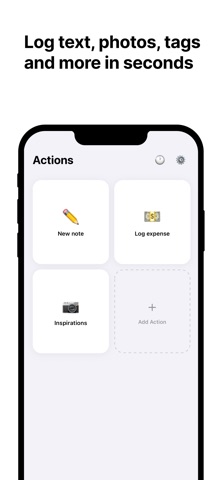
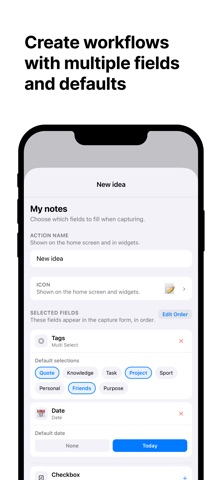
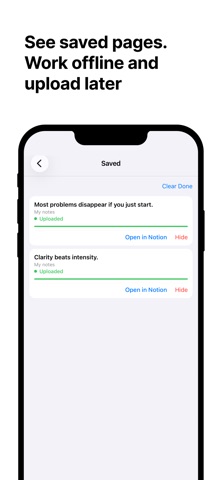
Log anything into your Notion databases in seconds. Set up custom actions, each with its own set of fields, and capture entries on the go without ever opening Notion. CAPTURE ANYTHING • Photos, text, numbers, dates, selects, multi-selects, checkboxes, URLs, emails, phone numbers, and files • Pre-fill fields with default values so common entries take a single tap • Create multiple actions for the same database with different field sets WORKS OFFLINE • Entries are saved to a local queue when you have no connection • Uploads happen automatically when you're back online • Track every entry with live status updates in the upload queue BUILT FOR NOTION • Connects via official Notion OAuth - your data stays yours • Direct Notion API integration, no middleman • Supports any full-page database with any combination of properties EXAMPLE WORKFLOWS • Expense tracking - log amount, category, and receipt photo • Daily journal - mood, tags, and a quick note • Workout log - exercise, sets, reps, and notes • Book notes - title, rating, and key takeaways • Meeting notes - action items with tags and dates Set up your databases once, then capture in seconds every time.
Latest release
What’s New
Assign any emoji to Action - use any emoji from the keyboard, pick from suggestions, or use your Notion database icon with one tap. Home screen widgets for quick access - launch actions straight from your home screen. Show up to 4 actions in a grid with Default or Glass style. More reliable uploads - fixed issues that could cause captures to stall during sync. Polished experience throughout - smoother navigation when configuring actions. Easily suggest features or report issues from Support.
Audience growth
Ratings growth
Baseline captured. Growth appears after the crawler observes a changed rating count.
Momentum comes from crawler snapshots for the tracked storefront. “Viral growth signal” means unusually fast recent rating gains; it is an indicator, not download data.
Price tracking
Price intelligence
First snapshot captured. The trend line starts after the next crawler price observation.
- First observed Aug 15, 2026 · 11:21 PM Free
Screenshots