About this app
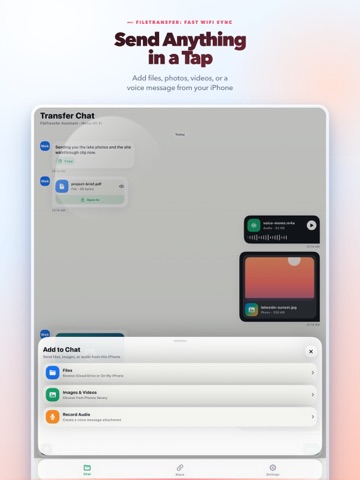
FileTransfer makes it easy to move files between your iPhone and the devices around you. Need to send photos to a computer, move a document back to your phone, share a video with another device, or pass a quick note without hunting for a cable? Open FileTransfer, start sharing, and use any nearby browser on the same Wi-Fi. Everything appears in one simple transfer chat, so it feels familiar: send a message, add a file, pick photos or videos, or record a voice note. Files from the browser arrive in the same timeline, making it easy to see what was sent and what still needs attention. What you can do with FileTransfer: - Send files from iPhone to Mac, PC, tablet, or another phone - Receive files from a browser back to your iPhone - Move photos, videos, documents, audio, and text - Preview photos, videos, and voice notes before saving or opening - Save received photos and videos to your Photos library - Open received documents in other apps - Keep a clear transfer history you can review or clean up - Share without creating an account FileTransfer is built for everyday moments: Send vacation photos to your laptop. Move a PDF from your computer to your phone. Record a quick voice note and share it instantly. Collect files from another device without emailing them to yourself. Transfer work files when AirDrop is not available. Your transfers stay under your control. FileTransfer is designed for nearby sharing on Wi-Fi, with no sign-in required and no cloud drive to manage. For best results, keep your iPhone open while sharing and make sure both devices are connected to the same Wi-Fi network. Terms of Use (EULA): https://www.apple.com/legal/internet-services/itunes/dev/stdeula/ Privacy Policy: https://filetransfer.iamdev.me/privacy.html Terms of Service: https://filetransfer.iamdev.me/terms.html Support: support@iamdev.me
Latest release
What’s New
Bug fixes & small performance improvements.
Audience growth
Ratings growth
Baseline captured. Growth appears after the crawler observes a changed rating count.
Momentum comes from crawler snapshots for the tracked storefront. “Viral growth signal” means unusually fast recent rating gains; it is an indicator, not download data.
Price tracking
Price intelligence
First snapshot captured. The trend line starts after the next crawler price observation.
- First observed Aug 20, 2026 · 9:24 PM Free
Screenshots