About this app
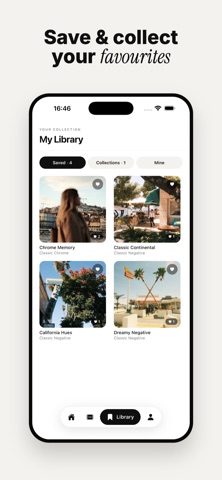
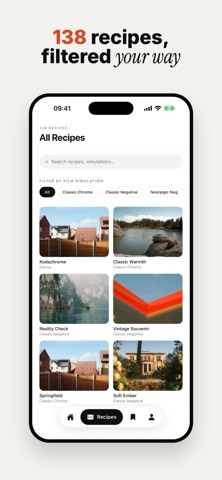
Filmsim Recipes is the complete library of Fujifilm film simulation recipes: the exact in-camera settings that give your JPEGs that signature look, straight out of the camera. No editing, no presets to import. Just dial in the settings and shoot. Browse a growing library of recipes shared by the community, find the ones made for your camera, save your favourites, and organise everything into collections. Ready to share your own look? Build your portfolio and submit recipes to be featured. WHAT YOU CAN DO • Browse 100+ film simulation recipes with real sample photos, with new ones added regularly • Search and filter by film simulation, camera model and mood • "Best for your camera" recipes matched to the body you shoot • Save recipes and organise them into collections • See every setting laid out clearly: film simulation, white balance, dynamic range, grain, colour chrome, highlights, shadows and more • Share beautiful recipe cards straight to your Instagram story • Create your own portfolio and submit recipes for publication FOR EVERY FUJIFILM SHOOTER Whether you shoot an X100VI, X-T5, X-T30 II, X-Pro3 or any recent Fujifilm body, you'll find recipes tuned to your sensor, from Classic Chrome and Classic Negative to bold, cinematic and timeless black & white looks. FILMSIM PRO Upgrade to Pro to unlock every premium recipe, create an unlimited portfolio and unlimited collections, and get early access to new recipes. • 7-day free trial • Subscription auto-renews; cancel anytime in your Apple ID settings Filmsim Recipes is an independent project and is not affiliated with, endorsed by, or sponsored by Fujifilm. Questions or feedback? support@filmsimrecipes.com Terms of Use (EULA): https://filmsimrecipes.com/terms-and-conditions/ Privacy Policy: https://filmsimrecipes.com/privacy-policy/
Latest release
What’s New
Studio: create Stories and carousel posts from your photos, with paper and torn-paper templates. Tap a photo to select it, then move, zoom and rotate it with your fingers. *Studio: reframing a photo now opens its own full screen editor. Tap a photo to move, zoom and rotate it, with nothing else competing for your finger. Tap an empty frame to pick several photos at once. Send to camera now works from your own recipes too, not just the ones in the library. Push notifications: you now hear about a recipe you submitted even with the app closed. Notifications can now be cleared, one by one or all at once.
Audience growth
Ratings growth
Baseline captured. Growth appears after the crawler observes a changed rating count.
Momentum comes from crawler snapshots for the tracked storefront. “Viral growth signal” means unusually fast recent rating gains; it is an indicator, not download data.
Price tracking
Price intelligence
First snapshot captured. The trend line starts after the next crawler price observation.
- First observed Aug 23, 2026 · 6:55 AM Free
Screenshots