About this app
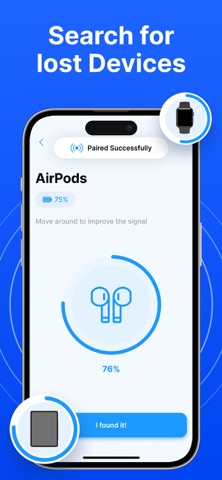
Using the received signal strength indication (rssi) in this our app, you may detect and locate your Bluetooth devices; the closer you are, the stronger the signal will be. Now you can quickly locate any Bluetooth device type. Use this app to find your Bluetooth device if you can't find it. You can look for devices like mobile phones, Bluetooth speakers, wireless headphones, and earbuds etc Main features of Find Air: My Device Tracker - Display the distance between our device and any adjacent Bluetooth devices that are found. - Distance Between Display Devices - Display Bluetooth device information in detail. - Check the Bluetooth device's connection strength - Show All Devices in a Pair. How to use the Find Air: My Device Tracker: 1. Activate the Find Air: My Device Tracker App. 2. Choose the device you wish to look for. 3. Move about to increase the distance score that is displayed. 4. You should have your device close by. Simply open the app, move to the closest place, and search for any Bluetooth device. The radar in the app will prompt you and indicate how close or far you are from the device as you draw nearer to it. DISCLAIMER: We have no connection to any of the above-mentioned businesses. We used only these devices to create and test our app. *** Upgrade to Premium to unlock unlimited access to all features. *** You can choose: - weekly subscription - yearly subscription - weekly subscription with 3 day free trial – Payment will be charged to iTunes Account at confirmation of purchase (After free trial period if offered). – Subscription automatically renews unless auto-renew is turned off at least 24-hours before the end of the current period. – Account will be charged for renewal within 24-hours prior to the end of the current period, and identify the cost of the renewal. – Subscriptions may be managed by the user and auto-renewal may be turned off by going to the user's Account Settings after purchase. – Any unused portion of a free trial period, if offered, will be forfeited when the user purchases a subscription to that publication, where applicable. Download Find Air: My Device Tracker now! Privacy Policy: https://sites.google.com/view/find-lost-bluetooth-devices/privacy-policy Term of service: https://www.apple.com/legal/internet-services/itunes/dev/stdeula/ Support: https://sites.google.com/view/find-lost-bluetooth-devices/support
Latest release
What’s New
Dear Users: We improved UI & UX, optimized Bluetooth searching, and fixed stability issues. Thank you for keeping Find Air: My Device Tracker up to date. We’re constantly improving the app to give you the best experience.
Audience growth
Ratings growth
Momentum comes from crawler snapshots for the tracked storefront. “Viral growth signal” means unusually fast recent rating gains; it is an indicator, not download data.
Price tracking
Price intelligence
- First observed Aug 11, 2026 · 1:19 AM Free
Screenshots