About this app
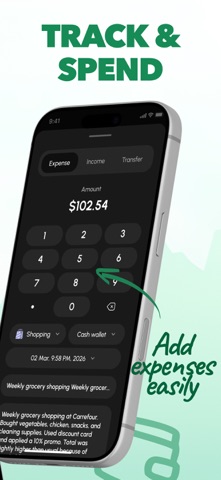
Finro Budget & Expense Tracker helps you stay in control of your money with simple, structured tracking and clear insights into your finances. SMART MONEY MANAGEMENT: INCOME OVERVIEW Add your income in seconds by specifying the amount, category, and date. Use common categories like salary, freelance, or gifts, attach notes, and keep every entry organized and easy to update. EXPENSE TRACKING – Log expenses with amount and category – Choose from predefined categories like food, transport, entertainment, utilities, health, and shopping – Add notes and dates to each transaction – Edit or delete records anytime CUSTOM CATEGORIES Create personalized categories that match your lifestyle. Customize them with icons and colors, rename when needed, and use them while tracking expenses. NOTES & DETAILS – Add comments to any transaction – Optionally attach photos – Keep all details stored with each record ACCOUNTS MANAGEMENT Organize your finances across multiple accounts such as cash, bank cards, or e wallet. Set initial balances, assign transactions to specific accounts, and track each balance separately. ANALYTICS & INSIGHTS – View expense distribution with charts – Track income and spending trends over time – Filter by day, week, month, or year – See totals and balance for selected periods – Compare monthly performance SAVINGS GOALS Set financial goals like travel, gadgets, or education and monitor your progress. Add funds anytime and stay focused as you move closer to your target. RECURRING EXPENSES – Create repeating expenses – Set daily, weekly, monthly, or yearly schedules – Automatically add transactions to history – Edit or disable anytime HISTORY & SEARCH Access your full transaction history with flexible filters by date, category, or account. Quickly find any record using search. Some features require a paid plan or one time purchase. FREE VERSION • Add income and expenses • Use predefined categories • Create custom categories • Add notes to transactions • Create and manage accounts • View transaction history • Access basic charts limited to the current month • Track up to 1 active savings goal • Use 1 recurring expense PREMIUM (PAID) VERSION • Analytics for any time period • Monthly comparison of expenses • Unlimited savings goals • Unlimited recurring expenses • Advanced charts and detailed reports • Extended analytics by categories Privacy Policy: https://docs.google.com/document/d/1beLu5IAjHnBO-HnI3gb-JW7SjaKYHQ-5_NnWR29zwyU/edit?usp=sharing Terms & Conditions: https://docs.google.com/document/d/1aryRr-zXQ8y8-s1bHVTfMHzx5hNs_oOiX7xvGH2ddws/edit?usp=sharing
Latest release
What’s New
This version includes bug fixes and general optimizations.
Audience growth
Ratings growth
Baseline captured. Growth appears after the crawler observes a changed rating count.
Momentum comes from crawler snapshots for the tracked storefront. “Viral growth signal” means unusually fast recent rating gains; it is an indicator, not download data.
Price tracking
Price intelligence
First snapshot captured. The trend line starts after the next crawler price observation.
- First observed Aug 27, 2026 · 6:26 AM Free
Screenshots